Category: Phone Systems

  • Fastmetrics Tranforms San Francisco Cultural Icon

    Fastmetrics Tranforms San Francisco Cultural Icon

    Case Study: San Francisco’s Contemporary Jewish Museum

    Fastmetrics case studies highlight real outcomes from the use of our managed services. In each case study we illustrate a customer problem, the solution and results.

    Problem: Outdated Phone System Not Meeting Needs

    San Francisco’s Contemporary Jewish Museum (CJM) is a beautiful SOMA based venue showcasing the diversity of the Jewish experience through art, music, film, literature and discussion. With an ever-changing curation of art and exhibitions, the museum needs quick, clear, and reliable communication to reach cultural partners around the world. When it was time to upgrade their phone system, The CJM trusted Fastmetrics to find solutions that fit with the project’s budget and schedule requirements.


    “Fastmetrics is providing voice service for 83 phones, and Internet service at 100 Mbps. They’ve been incredible with the transition – friendly and knowledgeable. They offered pricing that beat everyone. They were extremely flexible with the setup when we needed to make changes. They also helped greatly with the port and stayed on top of things to meet our deadlines”

    Ian Winsemius, IT Manager

    “I’ve enjoyed working with Fastmetrics customer support team and the techs that have assisted when needed. Your team is first class”

    Mark Hurtado, Director of Facilities and Security 

    contemporary jewish museum sf logo


    Solution: metricVOICE UCaaS, New Phones & Fiber

    Our team studied the client’s current needs and existing phone system. We recommended switching to metricVOICE because of its user-friendly interface that works across multiple devices. metricVOICE enabled the CJM to communicate seamlessly with team members, partners and guests anywhere. We offered a competitive flat fee for a comprehensive phone system and Internet service, working closely with the client throughout the process.

    Results: New Phones & Reliable Bandwidth To Support Call Quality

    The CJM was outfitted with 83 new phones on the metricVOICE system. This enabled the client to communicate via desk phones, browsers and mobile devices. To further support the client’s bandwidth and voice service needs, we provided managed fiber Internet service at 100 Mbps symmetric. The entire project was completed affordably and on time. Fastmetrics is proud to serve such a culturally vital client. We look forward to continuing to support the CJM.

    Services Supported For The Contemporary Jewish Museum:

    metricFIBER: Managed Fiber Internet Service

    metricVOICE: Adaptive Business Voice & UCaaS Solution

    All features included with metricVOICE for a flat monthly service fee, can be seen here.

    About Fastmetrics, Inc. Building & Business ISP

    Since 2002, Fastmetrics is the Bay Area’s only dedicated business ISP. We provide telecommunication services in California and the San Francisco Bay Area. Reliable service – backed by better live and local support. From install to 24-7 proactive monitoring, get treated like a VIP customer. Not a number by a faceless call center. We specialize in managed business internet and phones, dedicated high speed business fiber internet, business WiFi, SIP voice solutions / UCaaS and managed network services. We are a Microsoft and Cisco Meraki Partner. Our team are Certified Cisco Specialists, Ubiquiti Enterprise Wireless Accredited and Polycom Authorized Solution Advisors. We take care of your business network, so you can focus on growth.

    Microsoft Partner logo - Fastmetrics      Cisco Certified Specialist  Ubiquiti Enterprise Wireless Admin (UEWA) Accredited

  • Fastmetrics Helps Bay Area Pediatrics Practice Pivot Overnight

    Fastmetrics Helps Bay Area Pediatrics Practice Pivot Overnight

    Case Study: Multi-Office Bay Area Pediatrics Practice

    Fastmetrics case studies highlight real outcomes from the use of our managed services. In each case study we illustrate a customer problem, the solution and results.

    Problem: Overcharged & Underserviced For Business Phone Service

    A multi-office Bay Area based pediatrics practice approached Fastmetrics to fix a long time problem with their business phone system. Families rely on the practice’s call center receptionists and telephone advice nurses for vital information, but the practice was being overcharged and underserviced for a business phone system from a major national provider. Fastmetrics agreed to improve the practice’s communication system and add more flexibility, so they could more effectively interact with patients’ families.


    “With our new Fastmetrics phone system, when shelter-in-place was issued we were able to pivot literally overnight to have the majority of our staff working from home the next day…Fastmetrics has truly been a gamechanger for us”

    – Steve, Executive Director – Tamalpais Pediatrics, Larkspur & Novato

    tamalpais pediatrics logo

    Solution: metricVOICE Upgrade, New Phones & Support For A Better Price

    Fastmetrics was attentive to the practice’s immediate need and delivered a new level of service for a better price, a true upgrade. We implemented and set up new equipment and a phone system exactly how the client needed it to work. Following COVID-19 stay at home orders, the practice was able to implement our metricVOICE solution overnight at home without disruptions to communications or business, and employees were able to convey information safely.

    Results: More Adaptive Comms & Higher Levels Of Customer Service

    Communications, productivity, and efficiency have remained consistent for the pediatric practice despite unprecedented quarantine protocols. Seamless internal and external communications continued even with newly set up remote staff, working from home. The practice was able to adapt immediately to meet patient care and contact needs due to the phone system implemented by Fastmetrics. All at a lower cost with higher levels of customer service.

    Services Supported For Tamalpais Pediatrics:

    All features included with metricVOICE for a flat monthly service fee, can be seen here in this voice features list.


    About Fastmetrics, Inc. Building & Business ISP

    Since 2002, Fastmetrics is the Bay Area’s only dedicated business ISP. We provide telecommunication services in California and the San Francisco Bay Area. Reliable service – backed by better live and local support. From install to 24-7 proactive monitoring, get treated like a VIP customer. Not a number by a faceless call center. We specialize in managed business internet and phones, dedicated high speed business fiber internet, business WiFi, SIP voice solutions / UCaaS and managed network services. We are a Microsoft and Cisco Meraki Partner. Our team are Certified Cisco Specialists, Ubiquiti Enterprise Wireless Accredited and Polycom Authorized Solution Advisors. We take care of your business network, so you can focus on growth.

    Microsoft Partner logo - Fastmetrics      Cisco Certified Specialist  Ubiquiti Enterprise Wireless Admin (UEWA) Accredited

  • 5 Tips To Improve VoIP Call Quality

    5 Tips To Improve VoIP Call Quality

    IP Voice Is Great – Ensure VoIP Calls Are Great Too

    Voice over Internet Protocol (VoIP) phone services are efficient for workers and businesses to manage voice calls anywhere. VoIP is now a popular alternative to traditional telephone systems. VoIP uses Internet Protocol (IP) to connect and communicate with callers. With sufficient bandwidth, you can pretty much contact anyone via this type of voice service. Besides making / receiving calls over the Internet, a VoIP phone system can also provide other features. These include call recording, call forwarding, voicemail, etc. Overall, a VoIP phone system is a significant upgrade compared to an analog phone system. However, even with these advantages, a VoIP phone system may experience sound issues from time to time.

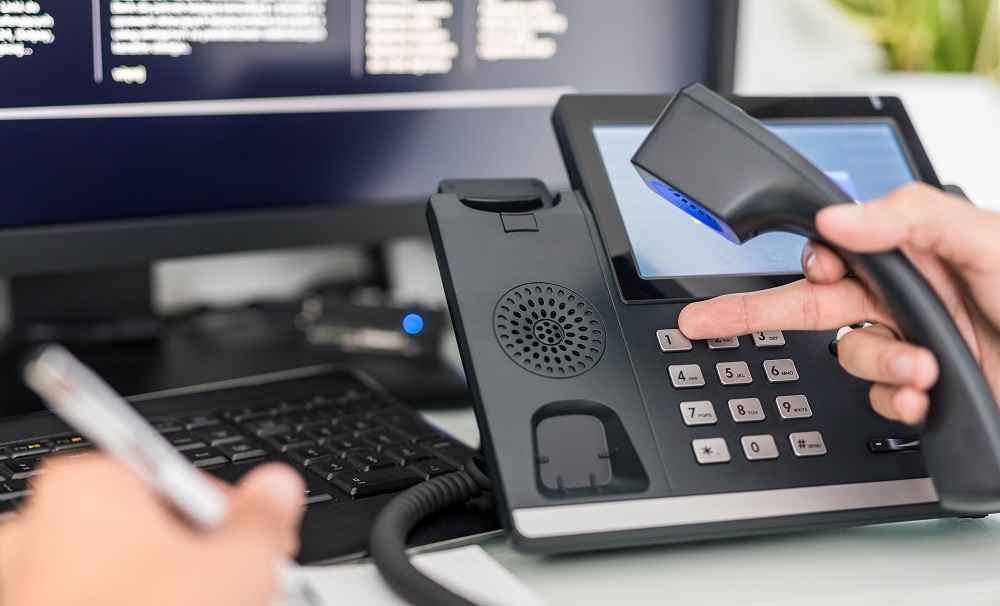
    Man using a VoIP compatible desk phone for VoIP calls

    When these issues are unresolved, they can cause complications on calls with clients, eventually affecting customer satisfaction. Fortunately, below are some steps to enhance VoIP calling experience. Use these five key tips to improve the quality of your VoIP calls and provide a great customer experience, every single time.

    1. Invest In CCaaS solutions

    A VoIP phone system is certainly more flexible than traditional landline calls. However, it can only perform its promised benefits when used properly. One way to enhance VoIP calls is by engaging a Contact Center as a Service (CCaaS) company, such as Odigo or other CCaaS solutions. Instead of managing VoIP business calls on your own, CCaaS outsources to help you provide better customer service to your clients. One major benefits of engaging such a company includes their cloud-based tech, which offers an open platform which integrates easily with existing systems.

    2. Utilize A VoIP Prioritized Router

    A common issue which affects VoIP call quality is running ALL traffic over a single router. Using the same router for all IP based traffic (voice, data, etc), risks the Quality of Service (QoS) of calls. Prioritize VoIP calls by investing in a business router that can handle VoIP usage. When choosing a router, opt for a VoIP optimized one, suitable for VoIP traffic. Consider selecting a router with extra features like a Virtual LAN (VLAN) or Session Initiation Protocol (SIP) to improve voice packet reliability. More advanced managed routers or services such as MPLS, can also go a long way to prioritize VoIP traffic.

    3. Use High Quality Headsets

    Poor sound quality during calls is a turn-off for clients and frustrating for VoIP users. These may be caused by simple hardware related issues. Cheap headsets can affect VoIP call quality. Headsets with thin or poorly insulated cables can impact audio clarity. Consider investing in higher quality headsets. You don’t necessarily need a top shelf model, but take time researching for better headset options. These may have noise cancelling features, bluetooth compatibility or cables with solid insulation. (Check bluetooth compatible phones and headsets recommended by Fastmetrics).

    4. Replace WiFi with Digital Enhanced Cordless Telecommunications

    Most Wi-Fi connections will suffice for using the VoIP phone systems. But WiFi is also vulnerable to interference, especially when shared across a large area or when many devices are trying to connect to the same WiFi access point. This affects the signal strength and therefore VoIP. When you have “slow” internet, you’ll also likely experience calls which chop in and out, or delays with VoIP calls.

    Digital Enhanced Cordless Telecommunication (DECT) phones aim to solve the above issue, especially when making calls while away from your desk. DECT is a digital wireless technology that can be used for personal and business landline telephony. It has its own radio frequency and can operate long-range calls, for better call quality with less risk of call interruptions.

    5. Check Bandwidth Usage

    VoIP delivers data in packets, over a network. But even with stable internet connections, voice packets may not get through efficiently. Your network may experiencing congestion or not be optimized to support multiple users. As a result, both sides of a VoIP call may experience long periods of silence or robotic voices. To ensure high quality VoIP calls and avoid packet loss, consider increasing your bandwidth. Sufficient bandwidth helps handle high volumes of users and reduce latency, without affecting calls. The FCC states that a typical VoIP call uses between 5 – 25 Mbps of bandwidth. So if you have multiple callers using VoIP at the same time, allow enough bandwidth to cover that. Tip: if your business is running a VoIP based call center, Dedicated Internet Access (DIA) with enough bandwidth will be necessary for VoIP to function at peak quality.

    When using a VoIP phone system for business, ensure you keep these tips in mind to maintain the superior quality of your VoIP calls and boost customer satisfaction. Improving VoIP call quality is a worthwhile investment as it improves communication, which is vital for any business.

    About Fastmetrics, Inc. Building & Business ISP

    Since 2002, Fastmetrics is the Bay Area’s only dedicated business ISP. We provide telecommunication services in California and the San Francisco Bay Area. Reliable service – backed by better live and local support. From install to 24-7 proactive monitoring, get treated like a VIP customer. Not a number by a faceless call center. We specialize in managed business internet and phones, dedicated high speed business fiber internet, business WiFi, SIP voice solutions / UCaaS and managed network services. We are a Microsoft and Cisco Meraki Partner. Our team are Certified Cisco Specialists, Ubiquiti Enterprise Wireless Accredited and Polycom Authorized Solution Advisors. We take care of your business network, so you can focus on growth.

    Microsoft Partner logo - Fastmetrics      Cisco Certified Specialist  Ubiquiti Enterprise Wireless Admin (UEWA) Accredited

  • What STIR/SHAKEN Means For You

    What STIR/SHAKEN Means For You

    How STIR/SHAKEN Technology Combats Scam Calls

    The figures are grim. 1 in 3 Americans received a scam call in 2020. 59 million Americans lost close to $30 billion to phone scammers during the COVID-19 pandemic. To combat this epidemic of scam calls and mostly irrecoverable loss, Congress enacted the TRACED Act (Pallone-Thune Telephone Robocall Abuse Criminal Enforcement and Deterrence Act) in 2019. This legislation empowers the Federal Communications Commission (FCC) to recruit all phone carriers in the US to improve caller safety.

    elderly asian couple using smartphones in the park

    The FCC implemented the Act in stages. The agency required all major carriers in the US to implement STIR/SHAKEN technology by July 1, 2021. Verizon, T-Mobile, and AT&T have met this requirement as of June 30, 2021. Smaller phone carriers have until June 30, 2023 before they must fully be onboard. Until then, Americans continue to ignore calls from unknown callers. Or, use software to block spam robocalls. Still, the available software is not flawless. Spam calls still get through. Especially when the caller uses Caller ID spoofing to conceal their identity. More often, spam callers use Caller ID spoofing to make the number appear legitimate. Scam callers prefer this latter method because the call appears to be from a legitimate source, typically a nearby phone number with the same area code and exchange. Thus, an unsuspecting recipient is more likely to answer the call in hopes of talking to someone they know.

    More recently – especially during the lockdown in 2020 – scammers spoofed their numbers to make it seem like a phone call from well-known government agencies like the Internal Revenue Service (IRS) or local police department. Scam callers who use this spoofing method, typically rely on Voice over Internet Protocol (VoIP). VoIP allows voice calls using an Internet connection instead of a regular phone line. Legitimate businesses use VoIP as a cheaper alternative to making local, long-distance and international calls. However, scammers using computers or a special VoIP phone can equally make their calls appear to be from numbers from anywhere in the world.

    By exploiting this technology, scammers can also impersonate banks, government employees, customer service, or businesses, and make the recipient disclose critical business information, including employee data, sensitive bank details and intellectual property. Worse still, they can easily get away with it – could get away with it. The best recourse available to phone owners who wish to avoid calls from spoofed VoIP numbers is call blocking.

    What Is STIR Technology?

    STIR/SHAKEN is another technology that changes everything for persons on compliant carriers, but this technology is not a silver bullet.The technology uses a suite of protocols and procedures intended to combat caller ID spoofing on mobile carriers’ networks. Short for Secure Telephony Identity Revisited, STIR adds a digital certificate to the Session Initiation Protocol (SIP) information that callers use to initiate and route calls in VoIP. The digital certificate is like a pass. When a person makes a call, the VoIP service provider automatically examines the caller ID and compares it to a known list of trusted IDs they have provided to that specific customer. If it matches, the call goes through.

    What Is The SHAKEN System?

    Meanwhile, the SHAKEN system, short for Signature-based Handling of Asserted information using toKENs, is a suite of guidelines for public switched telephone networks. This technology exists to ensure scammers don’t bypass STIR and lets mobile carriers and law enforcement deal with users who have fake or missing STIR digital certificates.

    How Effective Is STIR/SHAKEN In Reducing Scam Calls?

    STIR/SHAKEN is very effective, but it is not a silver bullet because scammers can still change tactics or continue to use real numbers to make scam calls – only this time, it is easy to identify unknown callers on search engines like PhoneNumbers.org. Furthermore, it will be a while before STIR/SHAKEN really clamps down on existing VoIP numbers. The technology needs time to build a history of each number. Over time, STIR/SHAKEN will give carriers insights on scam numbers. It will also help mobile carriers accurately attest callers and build trust networks with other carriers. These take time. But in the end, there is no doubt about it. STIR/SHAKEN will significantly reduce the number of spam robocalls and scam calls from humans who target legitimate businesses and customers.

    About Fastmetrics, Inc. Building & Business ISP

    Since 2002, Fastmetrics is the Bay Area’s only dedicated business ISP. We provide telecommunication services in California and the San Francisco Bay Area. Reliable service – backed by better live and local support. From install to 24-7 proactive monitoring, get treated like a VIP customer. Not a number by a faceless call center. We specialize in managed business internet and phones, dedicated high speed business fiber internet, business WiFi, SIP voice solutions / UCaaS and managed network services. We are a Microsoft and Cisco Meraki Partner. Our team are Certified Cisco Specialists, Ubiquiti Enterprise Wireless Accredited and Polycom Authorized Solution Advisors. We take care of your business network, so you can focus on growth.

    Microsoft Partner logo - Fastmetrics      Cisco Certified Specialist  Ubiquiti Enterprise Wireless Admin (UEWA) Accredited

  • 7 Phone Automation Techniques To Boost Sales

    7 Phone Automation Techniques To Boost Sales

    Best Phone Automation Tips For Business Efficiency

    Phone automation has become extremely popular for businesses in many sectors. While the helpfulness of this technology is well established for serving customers, some disregard the potential it has for outbound sales. Phone automation, together with other sales tools, may help your sales team find new businesses, communicate more efficiently with prospects and boost conversion rates.

    Here are some of the most effective phone automation techniques to consider to increase business sales:

    1. Using A Call Menu To Give Callers Options
    Call menus or an auto attendant are a useful tool for phone automation. If your business hasn’t utilized this kind of technology, you’re missing out on one of the best ways to route and manage your phone calls efficiently. There’s a common misconception that it only works for bigger businesses that have large call volumes. No business is too small to utilize a call menu.
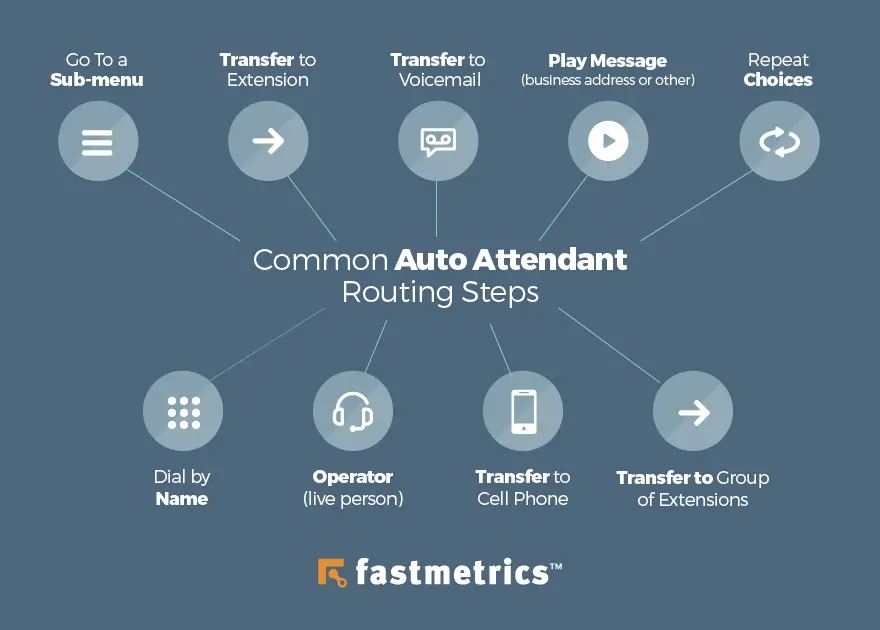
    auto attendant diagram routing steps

    An automated call menu can make you sound more professional when clients are making inbound calls. Today, most people tend to work with businesses or companies that respond efficiently and professionally. The menu greets callers, allows them to choose an option to hear important information, and directs them to the department or person they need.

    2. Make A Business Directory
    Creating a business directory allows you to instantly direct callers in a more professional way, to the correct person. With the help of a business directory, there’s no need for your customers to speak to a receptionist, before being directed to the right person. When someone makes a call, they can dial the extension that links to the right department or person without speaking to a live call agent. Callers can hear the extension corresponding with the department or person they need. From then on, callers can dial that extension directly anytime. This is helpful and effective for callers, especially when you have a small number of employees.

    3. Invest In Auto-Dialer
    Today, you’ll be able to see a lot of auto-dialers in the market as phone automation is becoming more and more relevant to businesses. If you want to use this option to make mass cold calls, you may want to invest in an app such as Call Cowboy Autodialer. By growing call volumes exponentially, employees can reach more targets. Whether you’re conducting B2C advertising activities or B2B sales campaigns on a regular basis, these apps can allow you to maximize productivity and efficiency.

    man holds a cell phone which can access automated services

    Also, if you want to use your existing phone, but want to keep your personal and business life separate, an auto-dialer app can make that possible. Boost caller productivity by automating cold calls from your telephone list, all while protecting personal numbers. Apps like these can take care of outbound calls, boost productivity and help you to look like a big business. You can also receive inbound calls, send SMS, and make custom notes on sales leads. Apps like Call Cowboy offer a predictive dialer. This can automatically dial several numbers simultaneously from a call list. Agents are then only get connected to a live answer.

    4. Scheduled Forwarding
    This phone automation technique is beneficial if you want your business to organize a custom schedule for managing inbound calls. This call time frame feature can be limited to certain virtual phone services. This feature enables call forwarding schedules by a user or extension basis, to ensure the right people are on a call schedule at the right time. This is great for automating shift alterations in your business and accommodating different employees who are working different days. The moment the forwarding schedules are set for a phone or device, this phone will only ring during the time frames scheduled.

    5. Email Notifications For Incoming Messages
    Email notification for your business messages is crucial because you may not always have free time to check your messages. And, in some cases, you happen to miss important messages that come through your phone. The main purpose of an email notification is for voicemails. You can set up your account to send a new voicemail message to a certain email address, choose any email address that you want aside from the account holder, and you’ll get notified once customers leave voicemails for you. This is a standard feature of the cloud based metricVOICE service from Fastmetrics.

    You can also set up several mailboxes for employees. Then, set every mailbox to route to the email of the person. Aside from voicemail, you’ll also get alerted every time new text messages come in from customers if you’re only utilizing business text messaging. You can set one email address to get new message notifications or, set up several email addresses to ensure that someone in your business is sure to respond right away.

    6. Set Business Hours
    Setting business hours when utilizing a virtual phone system is important, especially if you want to ensure when phones should ring. For instance, if you set your business hours from 6 am to 6 pm, then calls only ring your forwarding phone during this period. This will guarantee that your forwarding phone won’t be ringing at night. When you notice that your business is receiving lots of calls after business hours, you may want to set afterhours audio messages and offer the option to leave voicemails.

    7. Use A Call Recording System
    Using a call recording system will benefit your marketing team, as they’ll know what customers think about the services or products you offer. By recording phone calls with customers, the communications and marketing teams can review these and determine the positive points from the customers and which areas need improvement. The marketing team can then think of innovative ways to address these issues in its campaigns. The team can watch out for keywords that customers are using to maximize the ads and publications. A recording system keeps an archive of recorded calls, which can be helpful in verifying client information.

    It may not be necessary to incorporate such features into your phone system. However, at the very least, automating call management can make for a better experience for your caller or customer. A goal of phone automation is to enhance the experience of clients who are reaching out. As well as your experience when it comes to handling calls.

    Why You Should Consider Phone Automation For Your Business

    Most companies are constantly finding ways to improve their operating processes, whether these improve simplifying tasks, improve sales, or retain customers. Regardless of the areas you want to improve in your business operations, phone automation is an effective way to monitor communications and tasks in the company.

    Phone automation is one innovation that businesses may consider. It can save you on labor and time and provide a better call experience. It’ll also help prevent lost sales probably due to frustrated or confused sellers. There are ways automation can help make your business operate better. Read on further.

    When A Receptionist Isn’t Available, Someone Will Cover The Phone
    If your business only has one person to answer all incoming voice calls, what will happen when they’re out on a break, on vacation, or sick? You can hire a temporary worker or train other employees to do the job temporarily. If you consider phone automation, you’ll be able to cover the phone even though the employee isn’t around. It’s also helpful for answering incoming calls when your business is closed over the weekend or at night.

    Save On Labor Expenses
    Another good reason to automate your phone system is to save on your fixed labor expenses. Is call volume at your business overwhelming one employee? Instead of hiring employees to answer the phone, setting up an automated system can be beneficial. Phone automation can also provide basic information via pre-recorded messages. This can free up workers who previously needed to take or make calls.

    Process Payments
    If your business is processing payments via the phone, you can save time by considering phone automation. Callers can provide details via voice after verifying their accounts. A system can then handle the verification and transaction automatically, saving you some effort.

    Providing Important Information
    There are times when a caller doesn’t need to speak with someone at your company just to obtain the details needed. A customer can look for store locations or working hours by simply pressing a dedicated button in the system. In addition with automation, your phone will determine the caller by checking the caller ID details, which a business can assess to perceive which clients are calling during after-hours.

    Increase Customer Satisfaction
    Recommendations or referrals remain one of the most trusted forms of marketing. Convincing clients to recommend your business will supply you with effective leads that can drive brand reputation and conversions. In order to secure these referrals, you need to offer existing and prospective customers with a great customer experience. Phone automation is an efficient way to improve customer experience, by allowing customers to get information and resolve queries without taking too much time.

    To Boost Renewals
    Phone automation can allow your sales team to better track when a contract ends, as well as enable them to work proactively to engage customers in renewals. Voice and CRM integration is one such feature available with metricVOICE, which offers click-to-dial from any CRM.

    Final Say
    Without a doubt, phone automation is transforming how companies do business. It affects how sales professionals and marketers reach prospective clients in a professional, effective and efficient way. In fact, it helps businesses to better understand the needs of consumers and can offer conversations reflecting the pain points of prospects, thereby seeing higher conversion rates and engagement, while saving effort and time.

    Don’t underestimate the potential of phone automation in sales, as well as the overall positive effects it can have on your business. Phone automation might lack the human touch of live operators, but it can help you run your business in a more efficient way, giving clients information and account access. To support phone automation, consider a high-speed reliable Internet service to avoid costly downtime and interruptions in your workflow.

    About Fastmetrics, Inc. Building & Business ISP

    Since 2002, Fastmetrics is the Bay Area’s only dedicated business ISP. We provide telecommunication services in California and the San Francisco Bay Area. Reliable service – backed by better live and local support. From install to 24-7 proactive monitoring, get treated like a VIP customer. Not a number by a faceless call center. We specialize in managed business internet and phones, dedicated high speed business fiber internet, business WiFi, SIP voice solutions / UCaaS and managed network services. We are a Microsoft and Cisco Meraki Partner. Our team are Certified Cisco Specialists, Ubiquiti Enterprise Wireless Accredited and Polycom Authorized Solution Advisors. We take care of your business network, so you can focus on growth.


    Microsoft Partner logo - Fastmetrics      Cisco Certified Specialist  Ubiquiti Enterprise Wireless Admin (UEWA) Accredited

  • Unified Communications & UCaaS Explained

    Unified Communications & UCaaS Explained

    What Are Unified Communications & UCaaS?

    Unified communications is a concept that has been around for a long time – it is far from new. It is the process of combining or integrating communications (such as telephony, chat and video, with non real-time communication services, like email, fax, voicemail and SMS) under the same platform or device. Some basic examples of common unified communications include; the ability to send a fax via email or even sending work email from your iPhone.

    Basically, unified communications simplifies and combines, providing a consistent user-experience across devices and media types. ‘UC’ reduces the need for multiple devices, systems or software installations, to perform different communications tasks.

    unified communications across devices with team meeting
    Unified Communications Brings Devices & People Together

    More recently, unified communications have evolved. Fast. Today, ‘UC’ includes many different services, from voice, video, texting, conferencing, collaboration, email and more. All possible due to the emergence of technology. There are now specialist providers of Unified Communications as a Service (UCaaS). Most UCaaS providers offer service which allow users to unify multiple communications methods from a single provider. (As a UCaaS provider ourselves, we offer the ability to make unlimited free calls, texts, chats and conferences from a browser, phone or desktop, via a single cloud hosted solution). Typically, combining these communication methods under the same umbrella for a workforce is both more efficient and cost effective. Further benefits of UCaaS can be seen by clicking the link.

    To explain Unified Communications (UC) further, below is a short explainer video and transcript from UC Today News, with everything you need to know;

    Video transcript: We’re living in a brand new world spurred by digital transformation. As technology continues to evolve, we’ve entered an era where work is no longer refined to a specific desk, phone or computer screen. Business professionals have the freedom to share their skills and pursue new opportunities across the globe, all with nothing but the right device and a cloud connection.

    Now that almost half of the world are beginning to work remotely. Companies need to find a way to serve users that refuse to be tethered by wires and physical locations. The result has been an influx of fantastic communication tools designed for almost every touch point in the average business.

    The only problem is that we’ve innovated so fast that the sheer number of communication tools available is enough to overwhelm any worker or IT team. Fortunately, we have a new solution. Enter unified communications. The term “unified communications” or UC, describes not only how we connect different communication systems for the digital workforce but collaboration tools too.

    That’s why you will often hear the phrase “UC and C” which simply means unified communications and collaboration. Seamless UC ensures a high level of interaction throughout the globally-dispersed workforce. It breaks down the silos between the enterprise teams and ensures that no matter where you work, you can still access the same secure system.

    What Services Does Unified Communications & UCaaS Include?

    In short, UC incorporates messaging, voice and video calling, team collaboration, video conferencing and file sharing and so much more. In a world defined by a dizzying mix of platforms designed to suit organizations spread across vast places, UC simplifies the world of work. The right UC platform gathers everything your employees need to connect, share and work together on ideas in the same streamlined interface.

    What Are Some Benefits Of Unified Communications & UCaaS?

    Here are some of the major benefits of UC. Better productivity. Teams can connect however they feel most comfortable using any device or medium they choose.

    • Reduced costs. Because UC systems operate on the cloud, they allow companies to shift away from the traditional CapEx model to more of an OpEx model with fewer initial expenses.
    • Stronger performance. Because employees can both communicate and collaborate in an instant, they can solve customer problems faster and improve your business reputation.
    • Enhanced user experience (UX). A good UC strategy can delight your employees and even reduce turnover in your organization, by giving people more freedom to work as they choose.

    How Popular Are Unified Communications?

    The popularity of UC systems has grown more every year. In fact recent research indicates that the market will see an annual growth rate of 12.3% leading to a value of about 46 billion by 2020. More than ever, companies are beginning to understand how UC can help them better serve clients and employees alike.

    Perhaps the biggest trend driving the adoption of UC is digital transformation and the rise of the digital workforce. At its core, the digital workforce thrives on the idea that people should be able to access the tools they need to perform wherever they are and whatever device they use. Combine that with the ever emerging move to cloud communications and add all methodologies and you’ve got an environment primed for UC. As the workplace innovates faster, breaches global boundaries and discovers new opportunities, UC is the path to better connections and productivity.

    The words “communication” and “collaboration” appear so closely together in the modern world, that some people have begun to believe that they mean the same thing. After all, thanks to the widespread popularity of UC and communication apps equipped with collaboration tools, it’s easy to see how the two concepts go hand in hand. In fact collaboration in the workforce simply can’t exist without good communication. However just because the two ideas connect on a fundamental level doesn’t mean they’re the same thing.

    What’s The Difference Between Communication & Collaboration?

    All companies need communication to thrive. It doesn’t matter whether you’re running a small business of say three or four people, or a huge enterprise with dedicated call centers. You need communication. A communication strategy can come in various forms. Most organizations have an external communication strategy, which is a plan that they use to connect with customers, clients, shareholders and suppliers. Increasingly, external communication plans are becoming omni-channels, stretching all the way from VoIP to social media, SMS and much more.

    It’s equally important to have an internal communication strategy. This is the plan that companies use to keep internal staff members connected. It ensures that remote workers can connect with in-office employees through video conferencing and everyone can stay in touch in real time through persistent chat. Like external communication, internal communication often involves multiple channels. Where communication is about sharing knowledge, collaboration is about actively working together to achieve mutual goals. For instance, if you call someone on a VoIP channel to talk about an upcoming project, it’s communication. However if while you’re talking, you also start sharing screens and editing a project together, then it’s collaboration. Essentially, collaboration brings action to the communication space. The fact that collaboration and communication are so closely connected is what makes them so hard to distinguish at times. Even the collaboration tools we see on the market today can blur the definitions a little.

    After all, Slack is often touted as a collaboration tool but sending someone a message on Slack doesn’t necessarily mean you’re collaborating. However Slack does provide channels where teams can collaborate on projects together. Ultimately collaboration in the modern workforce is about providing an avenue for employees, executives or anyone else in a business to work together on the same project, no matter where they are.

    While today the conversation about collaboration is heating up, it’s important to remember that communication will always be the underlying ingredient of good collaboration. Without communication, we would be left with multiple people working on their own versions of a project using the same tool. Communication provides the insight and knowledge to connect minds across the workforce.

    It’s worth mentioning that collaboration tools have largely accommodated internal teams. However things are changing. We’re starting to see intercompany collaboration rising in popularity with features like guest access and shared channels.

    Communication and collaboration are natural partners in the digitally-transformed and in globally-distributed workforce. However before any enterprise can begin to successfully invest in collaboration tools, they need to first ensure they’re getting the most out of their communication strategy. If communication isn’t clear, accessible and easy to use across a range of touch points, then collaboration can’t work. Empower your people to share knowledge. Then you can help them to work together on tasks.

    There’s lots of more to tell you about UC and that’s why UC Today offers a whole host of free and available content for you to explore. From the latest news and products to smart guides and videos available at UCToday.com. Thanks for watching.

    About Fastmetrics, Inc. Building & Business ISP

    Since 2002, Fastmetrics is the Bay Area’s only dedicated business ISP. We provide telecommunication services in California and the San Francisco Bay Area. Reliable service – backed by better live and local support. From install to 24-7 proactive monitoring, get treated like a VIP customer. Not a number by a faceless call center. We specialize in managed business internet and phones, dedicated high speed business fiber internet, business WiFi, SIP voice solutions / UCaaS and managed network services. We are a Microsoft and Cisco Meraki Partner. Our team are Certified Cisco Specialists, Ubiquiti Enterprise Wireless Accredited and Polycom Authorized Solution Advisors. We take care of your business network, so you can focus on growth.
    Microsoft Partner logo - Fastmetrics      Cisco Certified Specialist  Ubiquiti Enterprise Wireless Admin (UEWA) Accredited

  • 15 Benefits of UCaaS

    15 Benefits of UCaaS

    UCaaS: 15 Benefits of Unified Communications as a Service

    Communication and network management is central to all aspects of work performance. Unified Communications as a Service (UCaaS) is a cloud-based model that combines multiple communication channels in a single delivery mechanism. UCaaS solutions typically include cloud voice, video, text, and email services, along with advanced call center, conferencing, presence and collaboration tools. Cloud-based services make it easier for stakeholders to communicate and collaborate internally and externally across locations and timescales.

    In order to be effective, UCaaS needs to be modern, comprehensive, and tightly integrated with other business services. UCaaS falls under the category of software as a service (SaaS), which can be differentiated from both infrastructure as a service (IaaS) and platform as a service (PaaS). While IaaS is involved with hosted infrastructure and PaaS is involved with development platforms, SaaS is about the delivery of everyday applications and communications solutions.

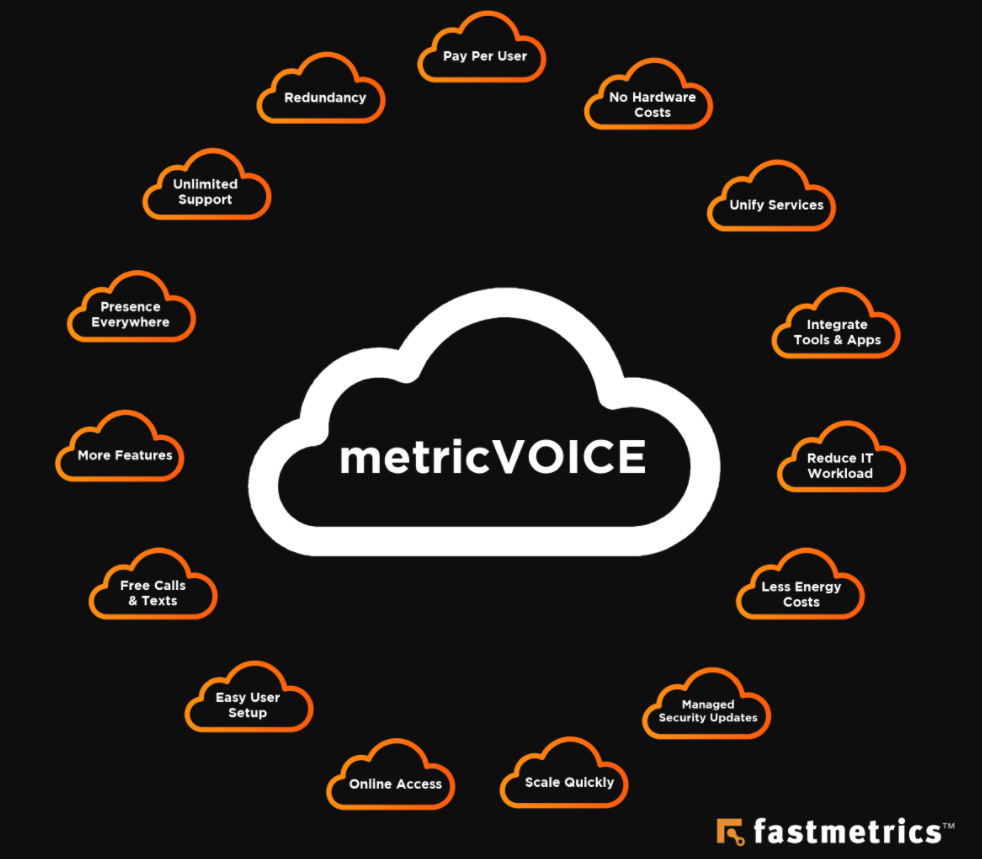
    15 cloud hosted voice and UCaaS benefits from Fastmetrics

    Depending on the implementation, UCaaS solutions typically combine a cloud-based private branch exchange (PBX) for internal and external communications with additional digital tools. UCaaS is mostly synonymous with hosted voice, cloud voice, hosted Voice over Internet Protocol (VoIP), hosted PBX, cloud PBX, and unified communications and collaboration (UCC). The adoption of UCaaS is likely to expand over the coming years as network speeds accelerate across the world.

    • According to Fastmetrics, roughly three-quarters of global businesses have moved to a cloud-based service or platform.
    • According to Transparency Market Research, the global virtual PBX market is anticipated to reach $14,368.4 million by 2026, at a growth rate of 15.3 percent between 2018 and 2026.

    Let’s take a look at 15 benefits of UCaaS in the modern workplace:

    1. Pay Per User
    Phone systems hosted on the internet are typically charged on a usage basis. This means you pay for user space and bandwidth as it’s required. In addition, UCaaS phone systems hosted in the cloud provide access to multiple high-end features and upgrades, for minimal to no extra costs. Monthly fees are generally set per phone line, user or ‘seat’ by providers. The software nature of this type of system proves to be much more flexible and affordable over time.

    2. No Hardware Costs
    There are no hardware purchase costs associated with a UCaaS model, unless of course you require physical handsets or headsets for voice. UCaaS enables advanced functionality without the addition of expensive infrastructure. While leasing arrangements or add-on costs may be required for phones and other equipment, a leasing model enables businesses to adopt new technologies faster and scale operations more effectively without having to worry about initial expenses or outdated features.

    3. Unified Services
    UCaaS enables the complete integration of communications services. Common services include business voice and telephony; conferencing solutions for web, audio and video; email and unified messaging systems; instant team messaging; and dedicated desktop and web clients. Unified services help businesses to set up and manage virtual office solutions that align with their operational needs.

    4. Integrated Tools & Apps
    UCaaS helps to align key communications systems with common operating system tasks. With that, integrated communications systems are now included in most professional operating systems.

    Many types of business applications benefit from UCaaS integration, including Customer Relationship Management platforms (CRMs), customer support, productivity, and data storage and management. According to IHS Markit, 60% of businesses view voice integration with business apps as critical. This goes to show that integrated communications services promote organizational efficiency and enhanced productivity.

    metricVOICE UCaaS benefits include tool, app and IP phone integrations for voice
    metricVOICE from Fastmetrics integrates with various apps, CRMs, browsers & IP phones

    5. Reduced IT Workload
    While modern businesses have more power at their disposal than ever before, lack of integration can easily lead to complexity and increased workloads. UCaaS solutions help to streamline workflows and reduce IT workloads across your organization. For example, the ability to communicate effectively from any location allows IT staff to work faster. The ability to align data assets with messaging tools enables IT teams to work smarter. In addition, when UCaaS providers manage communications off-site, your IT staff can focus on higher-priority areas or projects. This lessens the load for IT teams.

    6. Less Energy Costs
    The global movement away from isolated hardware solutions, towards integrated software solutions helps to reduce energy costs. Also to promote environmental sustainability. Cloud-based communications systems use less equipment and consume less power, thanks to centralized management and economies of scale. Using less energy is good for the environment and great for your operational budget.

    7. Managed Security Updates
    Software communications solutions delivered over the cloud are much easier to manage and much faster to update. Rather than relying on manual security updates tied to specific hardware devices, you can benefit from automated and tightly managed security solutions. UCaaS providers offer security certificates, industry expertise, and dedicated security resources to help mitigate risk and ensure business continuity.

    8. Scale Quickly
    The ability to scale and grow is the aim of most businesses. Cloud-based communications services are easy to manage and extremely scalable compared to traditional on-site solutions. You can quickly add or remove applications, update telephony resources, and manage users based on access requirements and security. It’s also much easier to analyze workflows and improve functionality over time. This flexibility is a major benefit to any organization, especially during an expansion or seasonal shift.

    9. Online Access
    The ability to align with and manage online resources is a major advantage of UCaaS communications. The online nature of messaging and conferencing tools makes them available at any time and from any location. This offers tremendous productivity benefits and enables a range of off-site and remote work opportunities. According to a report from Buffer, 98% of workers would love to work remotely for at least some of the time. In a modern world increasingly defined by big data and global networks, online access to communications simply makes sense.

    10. Easy User Setup
    Online communications systems are uncomplicated to set up, easy to manage, and simple to access. Cloud vendors that specialize in UCaaS solutions can migrate your system quickly and efficiently with minimum disruption to your work schedule. Once your system is set up and ready to go, new users can be added quickly and new groups can be managed effectively without compromising on security or compliance. As people get more accustomed to cloud systems and unified communications, the inefficiencies of current systems will become more widely recognized and the barriers to entry will get even lower.

    11. Free Calls & Texts
    Unified communications solutions offer free calls and texts to domestic and international locations. UCaaS solutions treat communications like any other form of data, providing significant cost savings. According to Fastmetrics, the cost of operating a phone system can decrease by 60-90 percent with a virtual PBX. Monthly managed services are more cost-effective and versatile than traditional phone systems. The adoption of cloud business phone systems also negates the need for hardware maintenance, ongoing management and unnecessary administration.

    12. More Features
    Unified communications technology has a much broader feature set than standard communications tools, including a wealth of features related to administration and maintenance, online integration, enhanced scalability, and built-in security. Common features include softphones, online fax machines, mobile apps, unified messaging, video collaboration, voicemail messaging, wireless mobility, digital receptionists, conference management tools, and CRM integration. The always-on availability of these features allows instant communication from any device and location.

    13. Presence Everywhere
    Regardless of industry sector or business size, popular UCaaS solutions promote better availability and collaboration in the workforce. The right service can provide new ways to connect with teams and customers, as well as key insights regarding presence independent of location. For example, you can see who’s online at any given time and manage your own presence based on need, location or workplace function. Advanced presence features may even show where a person is or what they are doing, which makes it easier to manage complex projects or clients.

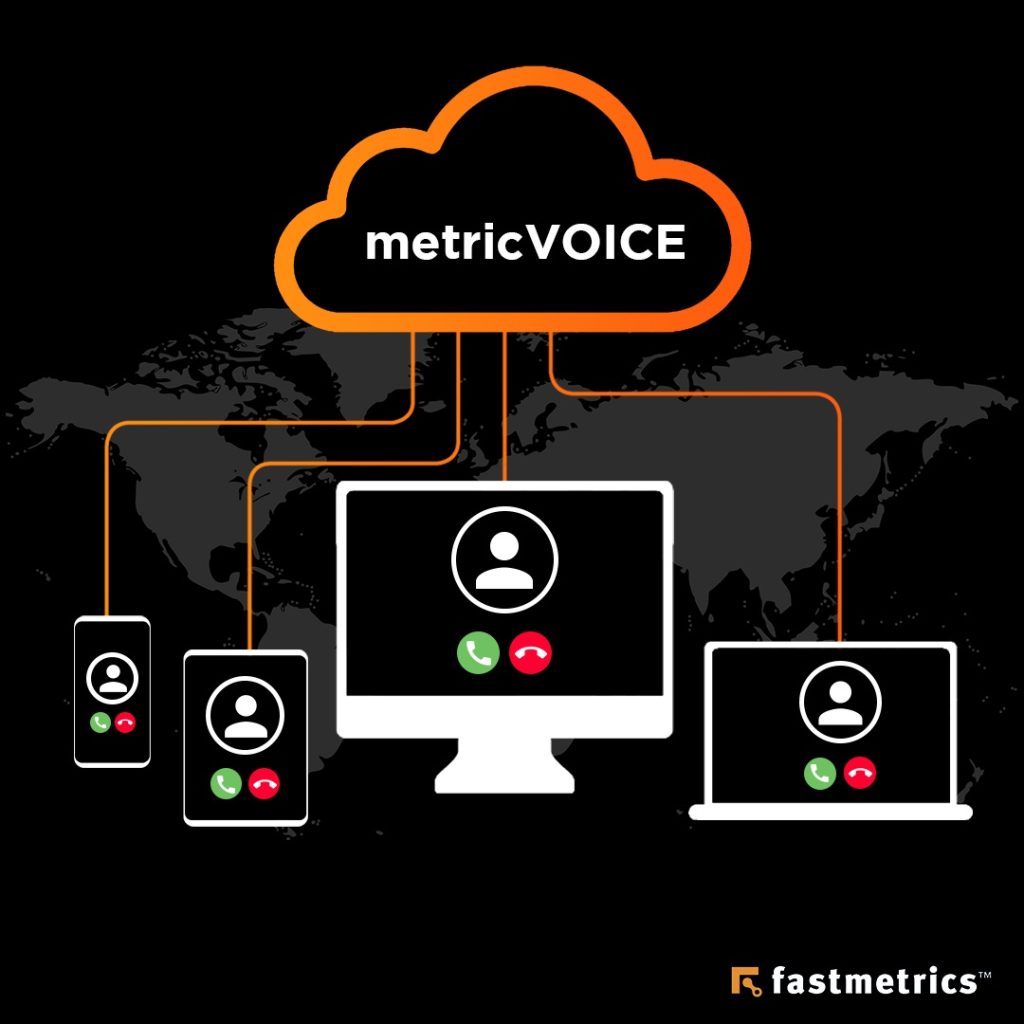
    metricVOICE UCaaS and VoIP solution by Fastmetrics - Presence across devices

    14. Unlimited Support
    Ongoing and trusted support is an important part of any cloud-based solution. Any initial migration phase can be challenging without help or the right expertise. So, it’s important to ensure access to continuous support and documentation. Ongoing support mechanisms to look out for include fast response times, efficient collaboration tools, 24/7 availability, product guides, and training and education programs. Working with a cloud vendor that offers unlimited helpdesk support is the best way to benefit from UCaaS.

    15. Redundancy
    Unified communications solutions offer numerous benefits over on-site PBX solutions. On-site hardware solutions are vulnerable to intrusion, human error, and disasters, including fires, floods, and power failures. Cloud-based communications systems, on the other hand, offer a range of redundancy features to mitigate risk and promote business continuity. Off-site storage promotes service and data integrity. Automated or managed security and update features help to ensure operational efficiency. Cloud-based services eliminate reliance on a single location or piece of equipment. This provides ongoing benefits for years to come.

    Digital communications represents the future of the modern business landscape. Cloud-based communications technology is more unified, better integrated, and much more efficient than traditional tools. If you need help migrating to a cloud-based platform or phasing in UCaaS services, please reach out to our friendly and supportive team.

    About Fastmetrics, Inc. Building & Business ISP

    Since 2002, Fastmetrics is the Bay Area’s only dedicated business ISP. We provide telecommunication services in California and the San Francisco Bay Area. Reliable service – backed by better live and local support. From install to 24-7 proactive monitoring, get treated like a VIP customer. Not a number by a faceless call center. We specialize in managed business internet and phones, dedicated high speed business fiber internet, business WiFi, SIP voice solutions / UCaaS and managed network services. We are a Microsoft and Cisco Meraki Partner. Our team are Certified Cisco Specialists, Ubiquiti Enterprise Wireless Accredited and Polycom Authorized Solution Advisors. We take care of your business network, so you can focus on growth.

    Microsoft Partner logo - Fastmetrics      Cisco Certified Specialist  Ubiquiti Enterprise Wireless Admin (UEWA) Accredited

  • 5G: How Will It Shape Our Future?

    5G: How Will It Shape Our Future?

    Decades ago in 1992, 2G (second generation) wireless technology was released. Since then, wireless technology has developed in leaps and bounds. After many years of development and much anticipation, 5G technology was released to the world in April 2019, amidst many claims of its revolutionary potential.

    As 5G continues to roll out throughout the world, delivering super speeds, groundbreaking cellular capacity and the lowest latency yet, it continues to enable the creation of entirely new applications while transforming existing industries. One of these industries is the world of sports. The introduction of 5G has seen changes in sports that will only continue to evolve and improve.

    How 5G Will Influence Sports Broadcasting

    The changes in broadcasting is probably the clearest way we can see the impact of 5G on sports. Cameras run using 5G eliminate the need for cables, enabling the cameras to cover a wider area of the fields during matches. The remote production capabilities of 5G means that there is no longer the need for broadcast trucks on the grounds of stadiums, and cameras can broadcast back to a central hub. This in turn saves broadcasters time and money and enables their production teams to cover multiple games happening simultaneously.

    Better Streaming

    different mobile devices showing football players and matches with spectators blurred in the background

    What a difference it makes, when watching your favorite team step onto the field, and feeling like you are right there in the stadium. This is arguably one of the most popular changes in sports that 5G has influenced, because it can greatly improve the fan experience of watching from the comfort of their own homes. With 5G, streams are higher quality, and more reliable, with no buffering and a crystalline picture, even when being streamed across multiple devices at the same time.

    Virtual Reality and Smart Glasses

    In a more distant future (that might not actually be that far off), player wearables could feed back to spectators wearing smart glasses, so that the spectator could get a POV unique to that player, almost as if they were playing the game themselves! This technology, powered by 5G, could also help coaches be better informed of player performance and tactics, so that they can be instructed on how to react better to a similar situation in the future.

    Better In-Stadium Connectivity

    One of the biggest complaints amongst spectators at major sporting events is being unable to connect to WiFi or use their cellular networks. Most existing mobile and Wi-Fi networks currently lack the capacity to provide uninterrupted connections in such densely populated environments, which is where 5G comes in. The new technology will enable fans to connect seamlessly and share the game live on their social media feeds and use the internet freely, regardless of how full the stadium is and how many simultaneous connections there are.

    The Ability To Coach Remotely

    Because of its ultra-low latency, 5G can enable the use of virtual reality technology – where the movements of players and coaches are tracked remotely through the use of wearables. Using this technology, coaches can train players in such a way that it is if they are together in person. This bridges the gap between promising young players and the coaching they need to reach their full potential, eliminating the need for long distance travel and saving both time and money.

    Analyzing Player Performance For More Informed Strategies

    Sports teams and performance athletes are using more and more data analytics to analyze player and team performance, using this data to influence training, strategy, recovery and injury prevention. With 5G, the amount and variety of data that can be collected is drastically increased, as well as there being new types of data available for analysis. For example, collecting data from wearables and using visual recognition algorithms to detect patterns and issue recommendations to coaches in real time.

    Better Real-time Refereeing

    When anything comes into question during a match, officials often use video playback to review what happened in order to make as precise a decision as possible. The super speeds and low latency of 5G means that this video playback is clearer and quicker than ever before, limiting the time spent waiting for feeds. In addition to this, with advances in technology, many sports now include ball tracking and sensor technology in order to minimize the room for error. With 5G technology, the room for error could be eradicated completely, by the use of complex technology that would run seamlessly on 5G. An example of this is the use of a smart ball containing sensors, and player wearables that can detect who last touched the ball.

    Real-time Sports Betting

    5G will also bring about drastic changes in sports betting, likely boosting revenues and the number of bets in the betting industry. When betting on sports, time is money, and you can’t afford to lose out because of even the slightest delay. With 5G, connectivity delays will no longer be an issue, and real-time betting will be possible both inside the stadium, or anywhere they choose.

    5G Set To Change The Future Of Sports

    According to a Vodafone study, 76% of decision makers in the sports industry plan to use 5G to drive innovation and improve the sporting experience. It can be hard to predict exactly how 5G will influence the future of sports, but with what we’ve seen so far, it’s clear that it’s going to be quite a futuristic one. If the whispers of virtual reality, smart glasses, and bionic implants are anything to go by, it’s certainly going to be exciting.

    About Fastmetrics, Inc. Building & Business ISP

    Since 2002, Fastmetrics is the Bay Area’s only dedicated business ISP. We provide telecommunication services in California and the San Francisco Bay Area. Reliable service – backed by better live and local support. From install to 24-7 proactive monitoring, get treated like a VIP customer. Not a number by a faceless call center. We specialize in managed business internet and phones, dedicated high speed business fiber internet, business WiFi, SIP voice solutions / UCaaS and managed network services. We are a Microsoft and Cisco Meraki Partner. Our team are Certified Cisco Specialists, Ubiquiti Enterprise Wireless Accredited and Polycom Authorized Solution Advisors. We take care of your business network, so you can focus on growth.

    Microsoft Partner logo - Fastmetrics      Cisco Certified Specialist  Ubiquiti Enterprise Wireless Admin (UEWA) Accredited

  • What Is SIP & How Does It Work?

    What Is SIP & How Does It Work?

    What Is SIP?

    So what is SIP? SIP stands for Session Initiated Protocol. It is a type of IP based communication, typically used for voice, but capable of much more than simple voice communication. Press play on the below video from sipsense.com to learn more about what SIP is and what it does. This video covers the basics on how SIP works.

    Video transcript: SIP, the Session Initiation Protocol, a protocol to initiate a session. But what is a session and why do we need a protocol to get one started? Well, we’re talking about a communication session. In fact an IP communication session using IP devices and an IP network. At its heart, SIP is a signaling protocol to set up an IP communication session.

    Now when we think about it, virtually all communications begin with signaling, even a face-to-face conversation. Dave here wants to talk to Nath. So he signals his intent by calling over. Hey Nath! A sound wave carried through the air. Recognizing the invitation to talk, Nath signals back to accept. What’s up? With Dave’s invitation signal answered with Nathan’s acceptance signal, both parties are ready to converse. They begin a dialogue, an exchange of media. In this case, more sound waves traveling through the air. Conversation complete, Dave issues another signal, this time to end the session and just to be polite, Nathan signals back, confirming he knows the session is ending.

    Signaling in an IP world follows the same principles. Instead of signaling with an audio wave through the air, IP devices signal with IP packets over the IP network. Now there’s lots of different types of IP packet, each with their own function and content. The important thing is that both sender and receiver understand the packet construct and what to do with this data.

    In IP communications, there are two types of IP packets. There are signaling packets and media packets. Signaling packets to establish or set up the session and media packets to then convey the audio, the video, the white boarding data and so on. With a voice session, the analog wave on one side is encoded into ones and zeros that are put into media packets and then sent out over the IP network.

    On the other side, the ones and zeros are unpacked and decoded, the wave reconstructed and played back to the user. Encoding and decoding also applies to video. Images from the camera are encoded. The binary digits packaged in media packets and sent out over the IP network. Now the other side, again the data is decoded, the image reconstructed and then displayed to the user.

    Now every second of conversation has many, many media packets, audio and perhaps video packets that convey the real time conversation. Simple enough. But for this media exchange to take place, we’re assuming two important things have already been sorted, that both parties know each other’s location. They know where to send their media packets and that both parties are using the same codecs for encoding and decoding the media.

    taking a SIP voice call via a cell phone

    So here’s the big question. How do we locate or find the other user’s IP address and how do we decide which codecs to use? We need a process, some descriptions and rules that help us locate each other and agree on codecs. What we need is a protocol and that’s where SIP comes in, the Session Initiation Protocol.

    It’s essentially a rule book that describes how to locate the other party and which codec to use for encoding and decoding media. It also defines how to construct and send IP signaling packets to set up the call and what to do to then manage the call.

    So now, if Dave wants to use his SIP phone to call Nath on his SIP phone, Dave’s phone follows all the steps defined by SIP to construct a special IP signaling packet, a SIP packet, populated with all the data needed to set up the call and sends it out over the IP network. On the other side, Nath’s SIP phone, understanding the rules of SIP, recognizes the packet is an invitation to talk and knows to alert Nath by playing the phone’s ringing sound.

    More signaling packets are exchanged. We will talk about those later. Then with signaling complete and codecs determined, the phones get busy exchanging media packets that digitally convey the conversation. Then sometime later, one of the parties signals the end of the call and both stop sending media. The call is terminated. Simple.

    Now understanding the essence of SIP is really quite easy. It’s just signaling to set up and manage IP communication sessions. Understanding its full potential however and knowing enough to fully implement real-life SIP solutions and to support real IP communications networks is something else.

    There’s much to learn, many complexities to unravel and understand. But worry not. That’s why we’re here. That’s the purpose of this course. By the time we’re done, you will be a SIP expert. It will all make good SIP sense.

    About Fastmetrics, Inc. Building & Business ISP

    Since 2002, Fastmetrics is the Bay Area’s only dedicated business ISP. We provide telecommunication services in California and the San Francisco Bay Area. Reliable service – backed by better live and local support. From install to 24-7 proactive monitoring, get treated like a VIP customer. Not a number by a faceless call center. We specialize in managed business internet and phones, dedicated high speed business fiber internet, business WiFi, SIP voice solutions / UCaaS and managed network services. We are a Microsoft and Cisco Meraki Partner. Our team are Certified Cisco Specialists, Ubiquiti Enterprise Wireless Accredited and Polycom Authorized Solution Advisors. We take care of your business network, so you can focus on growth.

    Microsoft Partner logo - Fastmetrics      Cisco Certified Specialist  Ubiquiti Enterprise Wireless Admin (UEWA) Accredited

  • What Is A PBX Phone System & How Does It Work?

    What Is A PBX Phone System & How Does It Work?

    PBX (Private Branch Exchange) FAQs

    This resource aims to answer all the common questions about a PBX. What it is, how it works, what it can do, key differences between a hosted VoIP PBX and a traditional PBX, features available and more. Click on a link in the index to see the answers available to a specific question.

    What is a PBX?

    PBX is the abbreviation of Private Branch Exchange. It’s a phone system that is used to make internal calls (employee to employee) as well as external calls (employee to outside callers). A Private Branch Exchange typically includes voicemail, call transfers and auto attendants, which replaced telephone switch attendants or operators. PBX’s provide a much more efficient way to make call connections and handle increased call volume.

    man in white business shirt holds cell phone using pbx - what is a pbx post
    Modern PBX Solutions Extend Beyond The Office

    Today, Private Branch Exchange services are commonplace over traditional switchboards. The latest and most advanced version of this exchange based phone system utilizes the Internet. Hosted, or cloud based Private Branch Exchanges are efficient for phone call management.

    How does a PBX work?

    A traditional PBX setup consists of on premise hardware, such as a cabinet. It allows phone users within an organization to make internal and external calls. To make external calls, it uses phone lines that connect employees with a Public Switch Telephony Network (PSTN).

    Today, organizations are using cloud based or hosted Private Branch Exchanges. These often require an Internet connection with adequate bandwidth or setup of MPLS to prioritize voice traffic. The basic function of a cloud hosted Private Branch Exchange, is the same as a traditional on-premise setup. A major difference is an external phone or voice service provider will “host” and manage the exchange for end users. Cloud or hosted PBX’s are commonly located in data centers. Instead of routing calls through on-premise hardware, voice data is sent using the Internet to the hosted or cloud Private Branch Exchange.

    What is a hosted PBX?

    A hosted Private Branch Exchange, also called ‘cloud based’, is a private telephone service that enables organizations to make internal and external calls and connections via the Internet. A hosted or cloud solution offers access to a variety of different calling and communication features. Some of these features may include;

    The aim of modern features associated with a cloud or hosted phone system, is to create a streamlined and efficient phone service. This applies to users both internal and external users of the phone system. A hosted exchange is managed and maintained by a voice or Internet Service Provider.

    How does a hosted PBX work?

    Like a traditional setup, a hosted phone system connects callers and phone numbers internally and externally. Instead of connections occurring over phone lines, they are made via the Internet and IP based phones with a hosted system.

    A cloud or hosted system eliminates the need for expensive and bulky on-site hardware. Management, servicing, maintenance and updates are included by the service provider, which ‘hosts’ the system offsite. Unlike traditional on-premise PBX services, a hosted phone system allows users to accept and make calls from a variety of devices. If a user’s device is connected to the internet and has the required application or software, a user can ‘mimic’ or maintain their office phone system presence from anywhere.

    What are the main differences between a hosted PBX and a traditional one?

    The major differences are;

    • A hosted or cloud setup operates utilizing Internet service.
    • No onsite hardware requirements for hosted or cloud based PBX’s.
    • A hosted or cloud Private Branch Exchange requires compatible IP phones or devices, such as soft phones or mobile apps.

    Due to the above, a cloud or hosted phone system can provide significant cost savings, due to a variety of factors including;

    • No large initial costs to purchase and physical phone hardware or equipment.
    • No need for an on-site installation.
    • Less space requirements – no room needed to house physical hardware.
    • No specialist management or on-site technicians for phone system maintenance.
    • Often free calls due to the use of the Internet to make connections.

    What are the benefits of going hosted over a traditional setup?

    Tasks such as scaling phone service or adding new users is simple. This makes a hosted system ideal for businesses who anticipate growth or large seasonable fluctuations in phone users. Going hosted provides a cost-effective, feature-rich business phone solution. More reasons how this type of system provides benefit;

    • A hosted business phone system negates the need for costly on-site equipment.
    • No lengthy installation, management or maintenance time required by staff.
    • IT or technical personnel can focus on larger projects, instead of maintaining or troubleshooting a phone system.
    • Online portals and free phone apps make it easy to customize and access phone service from any Internet connected device.
    • Many cloud-based systems offer extensive features that can improve business communications. A hosted PBX can make communications easy and efficient.
    • Access to enterprise level calling features, can be at more affordable costs than traditional services.
    • A hosted service ensures redundancy. Multiple servers can provide phone service in the case of an emergency. This minimizes the risk of relying on a single piece of hardware or equipment.

    What features are available with a hosted PBX?

    Most hosted or cloud-based services provide users with basic, custom or even advanced features with phone service. Some features are included with basic service fees for each user, ‘seat’ or phone line. Other features are not. Extra costs can be added to base phone service pricing for add-on features and functions.

    What type of businesses can benefit from a hosted PBX?

    A hosted PBX offers businesses of all sizes a flexible, reliable, and feature-rich business phone solution. Whether a startup looking for a business phone service that can grow and adapt to changing needs, or a Fortune 500 company looking to service a call center or large sales department, a hosted PBX can meet requirements.

    Are there any downfalls associated with a hosted PBX?

    For many organizations, a hosted PBX is an excellent solution to business phone service needs. However, there are some potential downfalls that are associated with this internet-based service. Businesses that have a poor internet connection or frequent internet outages may experience outages or service or voice quality degradation. It is important to consider current internet capabilities before making a switch.

    How much does a hosted PBX cost?

    Hosted PBX services are typically more affordable then traditional PBXs. The exact cost varies based on the provider. Costs are often applied on a per user, line or ‘seat’ basis. Additional fees may be applied for setup, support or extra features such voicemail, CRM integration, auto attendants, etc.

    Are there any installation fees with a hosted or cloud-based PBX service?

    Each voice provider is different. The best way to determine install or setup fees is to contact a provider directly. Also check whether a provider offers an assisted install (installation instructions are shared with you) or in person setup at your office or business (a tech comes to you. This is a nice to have if you will be using phone hardware which requires connecting). As an example, Fastmetrics charges $0 for voice service setup and install, in person or assisted, as well as free training in using your phone system.

    Do I need hardware, or can I use a softphone with a hosted PBX?

    Many hosted PBX services allow for the use of hardware (an IP phone for example) or a soft phone. A soft phone such as Bria for the iPhone or X-Lite 5 for desktops is software that provides a phone interface. Once configured, users can make / receive phone calls using a keyboard, mouse, or cell touch pad.

    Can cell phones be used on a hosted PBX?

    Yes – cell phones are compatible with this type of phone system. Many hosted or cloud PBX’s allow users to access their business phone system anytime, anywhere.

    Many providers offer free smartphone apps allowing a user to make / receive calls from a mobile device, even when away from their desk or office. These apps allow phone service users to maintain business call presence anywhere. This feature is popular with large mobile or remote work forces. Or, for users who frequently travel.

    More recent unified communications inclusions for hosted phone service providers is integrated video chat via mobile or desktop. This allows video conferences using mobile apps.

    Are there any special requirements associated with a hosted PBX?

    For a hosted or cloud-based PBX service, or VoIP to function well, a reliable Internet service connection and appropriate IP compatible phones are required. Bandwidth requirements vary based on a variety of factors. These include the number of users and other requirements. You can contact Fastmetrics for help to determine your bandwidth needs for IP based voice solutions.

    What if I need to add additional phone lines?

    A cloud hosted PBX allows for the instant addition (or removal) of phone users as needed. As business requirements change, via the use of an online management system.

    Can I still send and receive faxes through a hosted phone service?

    With a hosted or cloud-based PBX, sending or receiving a fax is simple. This can take place via a traditional fax machine or online. A hosted PBX service allows for seamless integration across your organizational network, so faxes can quickly be stored or saved.

    What happens in the case of a power outage?

    For traditional PBX’s, a localized power outage can interrupt communications until power is restored. However with a cloud or hosted phone system, as long as a device is connected to the Internet, voice calls can be made and received.

    What type of onsite equipment do I need for a PBX?

    One of the reasons so many businesses choose to go with a hosted service is because of the limited equipment requirements, compared to a traditional system. A standard PBX requires a significant amount of on-premise equipment. A cloud or hosted solution requires handsets or devices and a reliable Internet service connection.

    What are PSTN calls?

    The Public Switched Telephony Network (PSTN) is the network of landline telephones that provides analog connections (basically, the traditional telephone system). For a significant period, the switched telephony network was the only system available for phone calls. However, modern technology and the Internet has paved the way for alternatives. This includes mobile apps and Voice over Internet Protocol (VoIP).

    As mobile and IP based phone solutions like VoIP increase in popularity and affordability, more businesses are choosing to use cloud or hosted solutions for phone service. However, they still need access to the PSTN. This calling functionality connects a hosted PBX user with the external telephony network.

    Can I use my existing phone number?

    Should you decide to migrate your phone service to a hosted PBX, you can keep your existing phone numbers in most instances. Most phone service providers offer seamless porting of phone numbers to their managed voice network.

    What if I have multiple business locations?

    Hosted phone systems are often cloud-based. It is not on-premise hardware. It can meet the communication needs of multiple business locations. Virtual offices, local or international offices with different phone numbers can be efficiently setup. It’s efficient to create a unified experience for employees and customers, regardless of how many locations your business has.

    Is a hosted PBX difficult to manage?

    As on off-premise service, management of a hosted Private Branch Exchange largely falls on the service provider. This negates the need for lengthy training of in-house IT staff. Hosted phone system providers do the work. They are responsible for ensuring a functional phone system. Additional customization or user management needs can typically be met via an online portal by end users. Online portals provide users with easy and intuitive access to their phone own system. Here is a video demo of an online user portal.

    Can I make international calls from my hosted PBX?

    Yes. In today’s global economy, international calling capabilities are a must. A cloud or hosted PBX provides this service. Businesses making many international calls may find a hosted or cloud based phone service reduces international call bills considerably.

    It is very standard today for most Private Branch Exchange service providers to offer free local phone calls. This is often accompanied with have competitive pricing on long distance calls. Rates as low as $0.02 per min for calls to Asia, $0.01 per mute for calls to Europe and $0.03 per minute to South America are common.

    What is an auto attendant?

    For companies with multiple departments, or those that don’t have a receptionist on staff, an auto attendant helps direct and transfer calls to the appropriate departments or individuals. This makes it easy to properly funnel calls, creating a smoother experience for both customers and employees. When you call somewhere and you are given automatic options to “press 1 for…, press 2 for…, press 3 for…’ that’s an auto attendant.

    What is call routing?

    Call routing systems, also known as Automatic Call Distributors (ACD), allow businesses to route traffic based on a variety of different qualifiers. These qualifiers can include;

    • Time of day
    • Current call volume
    • Requested department
    • Preferred language of the caller

    When utilizing call routing through a hosted Private Branch Exchange, businesses can take control and channel calls. Variables like employee departments, business hours and network strain during hours of high call volume can be factored in.

    What is VoIP?

    VoIP stands for Voice over Internet Protocol. It is a phone service that operates over the Internet, as opposed to traditional phone lines. VoIP is common today via services such as Skype. Also apps like Face-time or Whats App calling.

    For business phone service, many companies choose VoIP due to cost savings. Like with a hosted Private Branch Exchange, calls over the Internet can be made for free. (Unlike traditional phone lines with a pay per call structure). VoIP service can also offer enterprise-level functionality, without the cost of traditional phone services.

    About Fastmetrics, Inc. Building & Business ISP

    Since 2002, Fastmetrics is the Bay Area’s only dedicated business ISP. We provide telecommunication services in California and the San Francisco Bay Area. Reliable service – backed by better live and local support. From install to 24-7 proactive monitoring, get treated like a VIP customer. Not a number by a faceless call center. We specialize in managed business internet and phones, dedicated high speed business fiber internet, business WiFi, SIP voice solutions / UCaaS and managed network services. We are a Microsoft and Cisco Meraki Partner. Our team are Certified Cisco Specialists, Ubiquiti Enterprise Wireless Accredited and Polycom Authorized Solution Advisors. We take care of your business network, so you can focus on growth.

    Microsoft Partner logo - Fastmetrics      Cisco Certified Specialist  Ubiquiti Enterprise Wireless Admin (UEWA) Accredited