Fastmetrics is proud to be the Official Business ISP of the San Jose Earthquakes Major League Soccer (MLS) franchise. As professional football players, the San Jose Quakes know the importance of speed. But when it comes to speed, not only is it important on the pitch for game day. Speed is also a requirement to successfully power the Earthquakes operations, from their headquarters at PayPal Park, San Jose. With Fastmetrics high speed managed fiber Internet and live Bay Area support, the Quakes can meet their goals. On and off the field. The San Jose Quakes produced this video for us – “speed matters”. Take a look;
Video transcript: Speed matters. We all know this. That’s why Fastmetrics serves up gig to multi-gig business connectivity over fiber, Ethernet and direct to the cloud. Proactive monitoring PLUS Faster live support for the Quakes…and your team. Fastmetrics – the speed your business needs. Official Business ISP of the San Jose Earthquakes.
Jackson Yueill Scores Stunning Goal vs Houston FC
Some recent San Jose Quakes action from their July 18th match versus Houston Dynamo FC. Stunning volley goal from Jackson Yueill!
— San Jose Earthquakes (@SJEarthquakes) July 18, 2022
Fastmetrics: Official Business ISP of the San Jose Earthquakes
About Fastmetrics, Inc. Building & Business ISP
Since 2002, Fastmetrics is the Bay Area’s only dedicated business ISP. We provide telecommunication services in California and the San Francisco Bay Area. Reliable service – backed by better live and local support. From install to 24-7 proactive monitoring, get treated like a VIP customer. Not a number by a faceless call center. We specialize in managed business internet and phones, dedicated high speed business fiber internet, business WiFi, SIP voice solutions / UCaaS and managed network services. We are a Microsoft and Cisco Meraki Partner. Our team are Certified Cisco Specialists, Ubiquiti Enterprise Wireless Accredited and Polycom Authorized Solution Advisors. We take care of your business network, so you can focus on growth.
Case Study: San Francisco’s Contemporary Jewish Museum
Fastmetrics case studies highlight real outcomes from the use of our managed services. In each case study we illustrate a customer problem, the solution and results.
Problem: Outdated Phone System Not Meeting Needs
San Francisco’s Contemporary Jewish Museum (CJM) is a beautiful SOMA based venue showcasing the diversity of the Jewish experience through art, music, film, literature and discussion. With an ever-changing curation of art and exhibitions, the museum needs quick, clear, and reliable communication to reach cultural partners around the world. When it was time to upgrade their phone system, The CJM trusted Fastmetrics to find solutions that fit with the project’s budget and schedule requirements.
“Fastmetrics is providing voice service for 83 phones, and Internet service at 100 Mbps. They’ve been incredible with the transition – friendly and knowledgeable. They offered pricing that beat everyone. They were extremely flexible with the setup when we needed to make changes. They also helped greatly with the port and stayed on top of things to meet our deadlines”
Ian Winsemius, IT Manager
“I’ve enjoyed working with Fastmetrics customer support team and the techs that have assisted when needed. Your team is first class”
Mark Hurtado, Director of Facilities and Security
Solution: metricVOICE UCaaS, New Phones & Fiber
Our team studied the client’s current needs and existing phone system. We recommended switching to metricVOICE because of its user-friendly interface that works across multiple devices. metricVOICE enabled the CJM to communicate seamlessly with team members, partners and guests anywhere. We offered a competitive flat fee for a comprehensive phone system and Internet service, working closely with the client throughout the process.
Results: New Phones & Reliable Bandwidth To Support Call Quality
The CJM was outfitted with 83 new phones on the metricVOICE system. This enabled the client to communicate via desk phones, browsers and mobile devices. To further support the client’s bandwidth and voice service needs, we provided managed fiber Internet service at 100 Mbps symmetric. The entire project was completed affordably and on time. Fastmetrics is proud to serve such a culturally vital client. We look forward to continuing to support the CJM.
Services Supported For The Contemporary Jewish Museum:
metricFIBER: Managed Fiber Internet Service
metricVOICE: Adaptive Business Voice & UCaaS Solution
All features included with metricVOICE for a flat monthly service fee, can be seen here.
About Fastmetrics, Inc. Building & Business ISP
Since 2002, Fastmetrics is the Bay Area’s only dedicated business ISP. We provide telecommunication services in California and the San Francisco Bay Area. Reliable service – backed by better live and local support. From install to 24-7 proactive monitoring, get treated like a VIP customer. Not a number by a faceless call center. We specialize in managed business internet and phones, dedicated high speed business fiber internet, business WiFi, SIP voice solutions / UCaaS and managed network services. We are a Microsoft and Cisco Meraki Partner. Our team are Certified Cisco Specialists, Ubiquiti Enterprise Wireless Accredited and Polycom Authorized Solution Advisors. We take care of your business network, so you can focus on growth.
Mill Valley Little League Live Streaming via Twitch TV
Fastmetrics is pleased to be able to support the Mill Valley Little League. The MVLL is an entirely volunteer run organization, which started locally in 1964. To assist this local volunteer organization, we’ve setup free Internet service for the league to stream games via Twitch TV from Boyle Park. Combined with GoPro camera technology, our managed Internet service now powers live streaming for fans, players and parents via the Twitch streaming platform. Fastmetrics has vast amounts of experience with similar setups. Various current customers utilize our Internet services to support security cameras, live streaming and to also power surveillance operations.
How To Watch Mill Valley Little League Games
Live streams of all Mill Valley little league games can now be viewed via the Mill Valley Little League channel on Twitch or via the video player below. All streaming is from Boyle Park. For fans and parents, live stream notifications of the little league can be activated by signing up and following the Mill Valley Twitch TV channel.
Watch Twitch TV Live Streaming
Mill Valley Little League Information
The Mill Valley Little League has been purely volunteer run for over fifty seven years. The first season of Mill Valley Little League (MVLL) was played at Boyle Park way back in 1964. The first league season consisted of games played between two local teams from Mill Valley – the Yankees and the Indians. Other local teams included the Giants baseball team of Sausalito and the Braves from Tiburon in the inaugural season.
Today with the help of a dedicated group of volunteers, the MVLL has grown to a include a number of different teams. The MVLL continues to organize and help more than six hundred local Bay Area kids play and enjoy baseball, every single season. More information about the little league, game schedules, calendar events, parent / team info and merchandise can be found on the MVLL website here.
About Fastmetrics, Inc. Building & Business ISP
Since 2002, Fastmetrics is the Bay Area’s only dedicated business ISP. We provide telecommunication services in California and the San Francisco Bay Area. Reliable service – backed by better live and local support. From install to 24-7 proactive monitoring, get treated like a VIP customer. Not a number by a faceless call center. We specialize in managed business internet and phones, dedicated high speed business fiber internet, business WiFi, SIP voice solutions / UCaaS and managed network services. We are a Microsoft and Cisco Meraki Partner. Our team are Certified Cisco Specialists, Ubiquiti Enterprise Wireless Accredited and Polycom Authorized Solution Advisors. We take care of your business network, so you can focus on growth.
What is Ethernet and how does it work? Which type of Ethernet cable should I use? All these questions and more, answered below. Watch the videos or read the information below. Learn more about what Ethernet is and what it can do for you or your network, at home or at your business.
What Is Ethernet?
In the below video from Sunny Sun find out what Ethernet is (also known as the IEEE 802.3 standard). Sunny is an Associate Professor of Cyber Security at the University of Saint Mary in Leavenworth, Kansas. He teaches courses such as networking, cyber security, computer forensics and programming. In the below video, Sunny explains 7 key things about Ethernet, right down to where the name ‘Ethernet’ comes from.
Video transcript: Hello and this is Sunny. Welcome back. Today my topic is Ethernet. What is ether? Ether was once thought to be media carrying light throughout the universe.
Ethernet was named for IEEE 802.3 standards in a way that physical media could similarly carry data everywhere throughout the network. Ethernet refers to a family of a local area network technologies or LAN technologies that share some main features. The implementation of the network might be different. But the basic topology, frame type and network access method remain the same.
7 things you should know about Ethernet:
Ethernet is a local area network (LAN) technology and is the most widely-installed LAN technology. Ethernet has largely replaced other competing LAN technologies such as Token Ring, FDDI and ARCNET.
Ethernet technology operates at a both physical and a data link layer of the OSI model.
Star-bus topology is a standard Ethernet topology.
In terms of cabling, an Ethernet LAN typically uses a TCP/STP fiber optics and a coaxial cable.
Ethernet media access method is CSMA/CD, e/212332weCarrier Sense Multiple Access with Collision Detection.
There are many versions of Ethernet speeds; 10 megabit, 100 megabit, 1 gigabit, 10 gigabit, 100 gigabit and even more.
Last but not least, seven. Ethernet is a base band system.
Please check out my playlist “Ethernet Basics” if you want to know more about Ethernet and some concepts mentioned in this video.
What Ethernet Cable To Use – Cat 5 Cat 6 Cat 7?
With so many options and category variants available, what Ethernet cable should you use? Below is a cable explainer from ThioJoe. Joe hosts one of the most popular technology explainer channels on YouTube, with more than 2.4 million subscribers. He takes a look through the options for Ethernet cables, from cat 5 through to cat 6 and 7.
Video transcript: If you’ve ever gone to buy an Ethernet cable for any reason, you may have noticed that there are several different types to choose from. Some of them may say Cat 5, Cat 5e, Cat 6, Cat 6a. But what do all of these mean and does it really make a difference which one you get?
Well, that’s what we’re going to talk about today. So you can know what’s worth buying and potentially save some money and also I’m going to go over a real world test to see how much of a difference it makes in your own home internet.
So first of all, what the heck do the cat ratings mean anyway? Well, for Ethernet cables, that stands for category and the different numbers represent different standards and specifications for each type of cable. So you can think of them like different versions. Now the good news is that all of these cables will typically “work” since the new versions are all backwards-compatible. They all use the same RJ-45 connector, often just called the Ethernet port. But the difference in the different ones are the rated performance of each.
The Different Types Of Ethernet Cable
So let’s go over all the different types of Ethernet cables you may come across from Cat 5 all the way through Cat 7 and beyond. The first type is really common which you probably already heard of. It’s called Cat 5. However these days, when someone says “Cat 5,” they’re probably referring to the newer version of Cat 5e, but we’re getting a little bit ahead of ourselves with that.
Now a true Cat 5 cable is actually obsolete and you probably can’t even buy them anymore. A Cat 5 cable is only rated for up to 100 megabits per second at 100-meter maximum length and that’s with a 100 megahertz bandwidth.
So obviously only being rated for 100 megabits, you’re almost never going to see these anymore because usually one gigabit is kind of the minimum and if you’re still using one, you should definitely replace it. Because in addition to having a slower speed, it also might be less reliable than the new types we’re going to talk about in a second and this brings us to Cat 5e which I just mentioned and the Cat 5e stands for category five “enhanced”.
So Cat 5e is very common these days and it’s rated for one gigabit speeds at 100 meters as opposed to the original one. It’s just 100 megabit and again this has a bandwidth of 100 megahertz and this is due to the improved specs regarding twisting of the wire pairs inside, shielding and other improvements which reduce “cross talk” or the interference of the different signals, which would reduce the speed. Also a regular Cat 5 cable only required two twisted pairs of wires inside while Cat 5e uses four. So obviously it can transfer more data. A Cat 5 cable may have had four but it only required two.
So an important thing to note is that the ratings certifications are for the bare minimum specs. So it’s very possible that a cable will be capable of much more than what it’s rated for. So for example a Cat 5 cables might actually be capable of close to gigabit speeds if it’s a really high quality premium cable even though it’s older and the same will go for all of these other types. It’s just the rating is basically a guarantee. After Cat 5e came Category 6, which bumped the spec from one gigabit to ten gigabit at 55-meter length and with a bandwidth of 250 megahertz up from 100.
By the way, the bandwidth refers to the range of frequencies that the cable is able to reliably use, which explains why it would improve the speed. It has got more “space” to fit the data in a way and the Cat 6 further reduces cross talk. That’s kind of the main way to improve the speed in addition to the bandwidth using tighter wound wire pairs and may also use things like a plastic core through the middle of the cable to better separate the internal wires and things like that.
I would say Cat 6 is a good choice if you’re really not sure what type of cable you’re going to need since it probably won’t be that much more expensive depending on where you buy it and it will future-proof your cable for a while. You will probably be able to use it for the near future.
But this is especially important if the wire can’t easily be replaced. Like if you’re wiring a house for example where it would just be in the walls forever, I would definitely get at least Cat 6, probably even one of the higher-rated ones we’re about to talk about.
But if you’re just buying a general purpose Ethernet cable for your laptop or something, Cat 5e would definitely be fine as well since I doubt any of your devices right now are going to be capable of 10 gig anyway. So Cat 5e, Cat 5, 6, whatever you want. So by now you might be thinking, “OK. Surely Cat 6 is pretty much the best. I mean why would you need anything more than 10 gigabit, right?”
Well, you might be right but we’re not going to stop there. What fun would that be? Because there’s also a Cat 6a and this is one is also capable of 10 gigabit but at a longer maximum distance of 100 meters instead of 55 and it has a larger 500 megahertz bandwidth. So if you are actually creating a 10-gig network, Cat 6a will be more reliable at getting your full speed since again it has got further improved specs for reducing that cross talk. It’s just going to be more reliable.
Now finally the big daddy of the Ethernet cables for now at least is Category 7. As far as I could tell, this is the fastest type you can buy at the moment. There are other cables that like claim to be Category 8 but I don’t think they truly are. Cat 7 is also ready for 10 gigabit speeds but with a higher bandwidth of 600 megahertz, even larger than the 500, and it has got the strictest specifications for reducing cross talk such as requiring shielding between individual wire pairs in the cable as well as for the whole cable itself.
This seems to be all about improving reliability. Not necessarily the speed since it doesn’t actually improve anything about 10 gigabit, even though it probably is capable of higher speeds if you had a switch that was capable of faster than 10 gigabit on that side.
So I think Cat 7 might be best suited for extreme future-proofing, permanent wire installations for people who are not just satisfied with the best but rather want the completely unnecessary. So if you’re wiring a house and you just want to go all out, get Cat 7. All right. So we’ve learned that there are tons of different Ethernet cables you can use. But does it even really matter? I wanted to find out. So I decided to do a quick real life test.
I got three different cables, a Cat 5e, a Cat 6 and even a Cat 7, all the same five-foot length and I wanted to find out if it would make a difference when I used it with a gigabit internet connection since that’s really the fastest internet you’re going to get right now anyway. And yeah, I know I could have done a logo gigabit test but I wanted to do it this way. It’s a little bit more practical I think.
So for this, I’m simply going to connect my laptop directly to the router using each cable and to make sure there’s no limiting factors, I have the router connected to the fiber optic intake with the Cat 7 cable, so there’s no limiting agent there.
So Which Ethernet Cable Is Best?
Just looking at the three cables I used here for the test, this is the Cat 5e. It’s definitely the thinnest. Although it’s not flimsy or anything. Then the black one is the Cat 6, definitely a little bit thicker and then of course the Cat 7, there are some noticeable differences. It’s very rigid. You can tell there’s a lot more shielding in here and it has got a metal connector. So definitely way higher construction quality.
So I went and did all that. And what was the difference? Well, none at all. As I pretty much expected, with such a short distance at only five feet, all the cables were more than capable of handling the gigabit connection. I had also tested the upload speed but it was very inconsistent even between tests of the same type of cable. So I just didn’t consider that in this one.
Then out of curiosity, I did a speed test on my desktop which is plugged into the port in the wall. So in that test, I would guess it had maybe an extra 50 feet of Cat 6 cable to deal with, as opposed to the other control test, and the speed only dropped less than 10 megabits. So even with about 50 feet of Cat 6, the loss was less than one percent of the speed. So really it’s not that big a deal.
So the takeaway here is that unless you need to worry about future-proofing your connection, it really doesn’t matter what type of cable you buy. Perhaps if you have tons and tons of cables right next to each other, it’s like really electronically noisy or something and you need that shielding. The improved shielding on the better categories might help you. But in all other cases, it really shouldn’t matter at all.
Now after looking at all this, you may be wondering, “What’s the point of all these other cables if you can’t even really use them, if it doesn’t make that big of a difference in most situations?” Well, part of it is marketing since it’s easy to say you need the better cable with the higher number, which of course costs more. But there is networking hardware out there that is capable of 10 gig internet. It’s usually commercial equipment though.
However, we are starting to see some 10 gigabit consumer-grade switches out there. For example, there’s the new Asus XG-U2008 switch, which has two 10-gigabit ports. It’s only about $250, much less than what you would spend on an enterprise switch, along with a regular gigabit port.
So you could hook up your computer and maybe a network storage device to the 10-gig port. Then everything else would go into the regular gigabit ones. That way, even if none of the other devices on the network are capable of 10 gigabit, it would allow multiple one-gigabit data transfers to multiple devices simultaneously.
So the 10-gigabit NAS or storage server will be able to provide out that 10 gigabit and then it could kind of be leeched off by as many devices as you want or of course you could do a full 10-gigabit transfer between the two devices plugged in. So between the server and your computer, if they’re both plugged into that other port.
In that sort of situation though where you do have 10-gigabit capability, you would need Cat 6 or higher at least for those two 10-gigabit ports and if it’s over any kind of distance, Cat 6a would be ideal because you’re going to get that better reliability. Even if it’s not that big of a difference, you still may as well. But something tells me that not too many people are going to be using 10 gigabit for a while. So I guess from all this, my takeaway is that even the old Ethernet standards have held up surprisingly well. I mean believe it or not, the RJ-45 connector used in all these Ethernet cables was first standardized in 1987. At that time, the minimum spec was only three kilohertz bandwidth and now it’s getting into the gigahertz.
So I think it’s safe to say that the connector will probably be here for a while. It’s not going anywhere anytime soon since it seems like there’s still a lot of room for expansion. We might even see 100 gigabit. Who knows?
So I think that is it. Hopefully guys, you thought this video was pretty cool and interesting. I would love to hear what you think down the comments section. Are you still using old Cat 5 cables you didn’t really know about? It usually says it printed on the side if you’re not sure. Or do you need that full 10 gig speed? I don’t know.
I myself kind of went crazy recently. I bought a bunch of Cat 6 and Cat 7 cables since I could never seem to find any Ethernet cables when I needed them. So I’m like, “May as well get the best,” and I’m actually using the Cat 7 cables to connect all the most important stuff in my network like the router and the switches hooked up to it for a maximum performance just in case. You know, even if it doesn’t make that big of a difference, I want to have the best and remove all doubt where it might matter.
But anyway, if you guys did enjoy this video, be sure to give it a thumbs-up. I would appreciate it and if you want to keep watching, I will put some other videos right here. You can click on these even if you’re on a phone and if you want to subscribe, I make new videos every Tuesday, Thursday, Saturday and also consider clicking the bell next to the subscribe button for notifications or else YouTube might not even show you the new videos at all.
So thanks again for watching guys. I’m looking forward to hearing from you and as usual, I will see you next time. Have a good one.
Why Is WiFi Slower Than Ethernet?
High speed WiFi services such as WiFi 6 are now possible today, with compatible hardware now rolling out. But wireless is never going to beat wired for speeds. Linus over at the Tech Quickie channel created a video to explain why an Ethernet connection via a cable, will almost always be faster than a WiFi connection.
Video transcript: Thanks for watching Techquickie. Click the “Subscribe” button. Then enable notifications with the bell icon, so you won’t miss any future videos. So picture this. You just wired your desktop PC up to some uber fast internet connection which is like super exciting because surely this will be no more lagging out of your favorite game or thrilling Skype dates. Then eager to experience this kind of speed on your laptop or mobile device, you buy a fancy-looking WiFi router. You key in your password and – wait, what? Your speeds aren’t even half of what you’re getting with the wired connection. What gives?
Well, unfortunately, wireless is pretty much always going to be slower than wired. It’s a near universal truth that becomes more and more obvious the faster you try to go, even if you spend tons of money on high-end wireless gear. But then – OK, now bear with me here, because EM waves do move faster through the air than electrons do through a wire. So what is it? Well, let’s start with the most obvious, signal range.
If you’re using an Ethernet cable and you want gigabit speeds, you can have a cable run of up to 100 meters. That’s roughly as long as a football field. This is because the signal inside the cable doesn’t deteriorate appreciably until you have a longer cable run.
But radio signals flying through the air such as WiFi are much more prone to signal degradation. Unlike a physical cable which has a copper wire inside that only carries network traffic and is wrapped up in materials to shield the signal from interference, WiFi signals are just blasted everywhere, meaning they have to compete with walls, your roommate’s microwave and other network traffic.
You see, unlike Ethernet where your device gets one dedicated pipe that runs to your modem or your router, there’s only so much spectrum available for your WiFi enabled laptop and your phone and anything else. What that means is that your device will often be broadcasting on the same frequency or channel as others, which can lead to more interference that can further degrade the signal and give your router more work to do to sort it all out.
But OK, hold on a second Linus. You can hook up lots of wired devices to a router as well. So doesn’t your router have to figure out where all those different signals are supposed to go? Yes. But WiFi and Ethernet have different strategies to combat packet loss, which is exactly what it sounds like, when a chunk or a packet of data doesn’t reach its destination.
Oftentimes this can occur due to a collision, when two devices try to transmit it at precisely the same time. If this happens, the packets have to be resent. So the way that an Ethernet connection avoids collisions is that once the sender determines that its path to the destination is clear, it sends the packet immediately. If the path is busy, the sender will send the data as soon as the path is clear again. WiFi on the other hand introduces a small delay once the path becomes clear.
The idea is that since a wireless router can’t magically detect a collision in midair, this delay reduces the risk of collisions. But as it does so, it also adds more latency. And although many leaps in WiFi technology have been made over the years, it still resembles much older school communications protocols in one important way. It is half-duplex, meaning that a WiFi gadget’s antenna can only be sending or receiving at any given moment, not both.
Now full duplex wireless is in the works but it’s still experimental and suffers from its own special kind of interference that results from the antenna trying to deal with both inbound and outbound signals at the same time. By contrast, Ethernet has been full duplex for quite some time now as it’s not difficult to simply put one wire in for transmitting data and another one for receiving it on the same cable.
So all other things being equal, don’t be surprised if your Wi-Fi connection always seems just a bit slower even if you do walk around with your smartphone neurotically duct-taped directly to a router.
Just please, please go faster. Speaking of going faster, if you’re a freelancer or a small business owner and you want to get your work done faster, check out FreshBooks. FreshBooks is the cloud accounting software that’s designed for the way you want to work and it’s the simplest, easiest way to be more productive, more organized and perhaps most importantly, get paid faster.
You can create and send professional-looking invoices in less than 30 seconds. You can set up online payments with just a couple of clicks to get paid up to four days faster and you can see when your client has seen your invoice to put an end to the guessing games. So don’t take my word for it. Try out FreshBooks for free. They’ve got a 30-day free trial available to our viewers down below and then guys, when you do sign up, that’s www.FreshBooks.com/Techquickie. Make sure you enter “Techquickie” in the “How did you hear about us?” section.
So thanks for watching, guys. Like, dislike. Check out our other videos. Don’t forget to leave a comment if you have suggestions for future As-Fast-As-Possibles. We do read those things, you know, and subscribe because if you don’t subscribe, bees, bees will eat your hair. They do that, you know. It’s not a misinformation. We’re a tech channel. People aren’t expecting biology factual accuracy.
About Fastmetrics, Inc. Building & Business ISP
Since 2002, Fastmetrics is the Bay Area’s only dedicated business ISP. We provide telecommunication services in California and the San Francisco Bay Area. Reliable service – backed by better live and local support. From install to 24-7 proactive monitoring, get treated like a VIP customer. Not a number by a faceless call center. We specialize in managed business internet and phones, dedicated high speed business fiber internet, business WiFi, SIP voice solutions / UCaaS and managed network services. We are a Microsoft and Cisco Meraki Partner. Our team are Certified Cisco Specialists, Ubiquiti Enterprise Wireless Accredited and Polycom Authorized Solution Advisors. We take care of your business network, so you can focus on growth.
Not all internet connections are equal. Especially when considering the advantages of dedicated internet access services. You’ve likely connected to public WiFi before, only to become frustrated with completing simple online tasks, like browsing or sending an email. Then you know the costs associated with a slow internet connection and shared bandwidth.
The stakes only increase when it comes to the quality of your business internet connection. In today’s digital world made up of eCommerce businesses, video conferences, 4K streaming and countless terabytes of cloud computing storage — dedicated internet access through a managed Internet Service Provider can make all the difference.
A slow connection is just one of the issues that can be shored up by taking advantage of a good managed internet service. The right solution will provide high-speed, dedicated internet access to your business, as well as better customer support, increased reliability, and better security.
What Is Dedicated Internet Access (DIA)?
Dedicated Internet Access (DIA) guarantees that your company is always receiving the maximum bandwidth that you’re paying for. Another popular option is paying for a “shared” connection, where the internet speed advertised in the package you purchased, is the maximum (not average) speed your company can receive.
Since a shared connection means you’re sharing your bandwidth with other people, your internet speed will fluctuate. Speeds can be unpredictable throughout the day and during peak usage times. Essentially, it all depends on the internet provider’s network traffic. During times of high use or network congestion, some ISPs may also slow down your connection in what is known as internet throttling. All these issues are avoided with dedicated internet access, as your company doesn’t have to share bandwidth with anyone, ever. It is a dedicated connection with dedicated bandwidth.
Dedicated Internet Access Explanation
When we think about internet, we don’t think about what type of connection we have. We simply expect fast, reliable service 24-7. However, not all internet connections are created equal. Today, many businesses operate on inexpensive shared internet circuits. On a shared network, if you’re trying to upload time-sensitive files while your peers are streaming data, you’re going to struggle with slow internet speeds and productivity. Because shared circuits equal shared bandwidth.
Businesses such as car dealerships, hotels, medical practices, real estate offices and banks can’t afford inefficient bandwidth and downtime, thus most opt for Dedicated Internet Access, (DIA). Dedicated circuits provide internet to a single location, meaning bandwidth is only available to the circuit owner. Therefore businesses with DIA actually receive the bandwidth they sign up for. No sharing.
Symmetric Upload & Download Speeds
If you’re considering a shared internet access agreement, understand that download speeds are going to be significantly faster than upload speeds. This is also one of the key differences when comparing internet services like DSL vs Cable vs Fiber. Shared internet access is set up this way. Not because Internet Service Providers are trying to take advantage, but because there is usually a higher demand from people using private networks for downloading versus uploading.
Download AND Upload Speeds Are Equally Important In Today’s Business Environment
Nothing is worse than trying to close a deal via video conference, only to have a bad feed or choppy connectivity at a crucial moment. However, with dedicated internet access, you won’t have that problem. Download speeds should be very close to symmetric. Matching your upload speeds 24-hours a day, seven days a week.
Improved Network Security
Cyber security for your business should be of utmost importance. Especially if you handle any sensitive data—such as employees’ or clients’ personal information. Additionally, cyber security is an essential part of your business’s financial security.
One way to boost your security is by using dedicated internet access. By not having to share your internet connection with those outside of your organization, strengthen your overall cyber security and insulate your network against breaches. When you have dedicated internet access, you can worry less about the threats from other networks. This allows you to better allocate your business’s resources toward tackling other weak links in your digital security.
Dedicated Internet Access Can Help Make Your Network More Secure
In addition to the basics, some internet service providers will offer additional security features with your dedicated internet access. This will often include firewall options to help block malicious code, viruses and other intrusions. As well as enhanced security services to help you identify spam, malware, and phishing scams. Identifying and neutralizing these threats is of utmost importance, as they can interrupt business or lead to sensitive data being stolen.
Dedicated Internet = Better Throughput
Ever get slow internet speeds, despite an internet speed test saying your bandwidth is high? Then you already know about the importance of throughput. It’s a bit technical, but the reality is that the bandwidth your company buys from an Internet Service Provider is not the circuit’s actual throughput. That number is just the bandwidth at which the circuit accesses the provider’s backbone network.
Unfortunately, this means that once your traffic hits the network, it can only move as fast or as slow as the network will allow. The best way to think about this is as if you’re commuting from work during rush hour. If the backbone network is over-subscribed to, it’s like everyone trying to get out of the city. On the same freeway. At the same time. Sure, the speed limit is 60 mph. You can zoom up the on-ramp from your place of business. But once you hit the freeway, things start moving at a painful crawl.
Shared Internet Service Connections Can Get Jammed Up During Peak Times
Generally, dedicated internet access customers are kept on a high-capacity, under-subscribed backbone network. Shared internet connections often run on a backbone network that’s cluttered with traffic — slowing everything down.
You often won’t see this advertised as part of the package when you’re looking into purchasing dedicated internet access. However, it’s something you’ll want to follow up with your sales rep about. Ensure you’re getting the most out of your network.
Scalable Internet Access
If your business is growing, the ability to scale up your resources as you expand is vital. With a dedicated internet connection, it’s easy to move the sliding scale of what internet services you’re paying for, to match your needs. There’s no need to pay for internet you don’t use. Then again, you can always just opt for unlimited data.
Dedicated Reliability & Improved Customer Support
One of the biggest advantages of managed and dedicated internet service, is that you most likely won’t need to utilize the 24/7 customer support that often comes with it. Dedicated internet access service plans should come with a Service Level Agreement (SLA). This agreement guarantees circuit up time. Typically, an SLA document also details a minimum time to resolve connectivity issues (if any), to restore complete service.
Dedicated Internet Services Often Come With 24/7 Support & Real-time Monitoring
Dedicated internet access service should be accompanied with high-end, reliable network equipment. This further reduces connectivity issues.
Final Thoughts: Choosing The Right Dedicated Internet Access Plan For Your Company
Whether you’re in the Bay Area or elsewhere, business internet access needs should not be underestimated. Depending on your company, symmetrical upload and download speeds provided via a managed internet service and better throughput — can be absolutely essential to your success.
Additionally, the security risk of a shared internet package may not be worth the savings. The actual costs and the damage to your brand’s reputation from a data breach could be astronomical. (Depending on the size of the breach and the sensitivity of the information stolen). When it comes to cyber security, it is always better to be safe than sorry.
The bottom line is that having reliable and dedicated internet access can increase the productivity of your workforce, as well as improve your bottom line. Have more questions about what dedicated internet access or managed services can do for your business? Contact Fastmetrics today.
About Fastmetrics, Inc. Building & Business ISP
Since 2002, Fastmetrics is the Bay Area’s only dedicated business ISP. We provide telecommunication services in California and the San Francisco Bay Area. Reliable service – backed by better live and local support. From install to 24-7 proactive monitoring, get treated like a VIP customer. Not a number by a faceless call center. We specialize in managed business internet and phones, dedicated high speed business fiber internet, business WiFi, SIP voice solutions / UCaaS and managed network services. We are a Microsoft and Cisco Meraki Partner. Our team are Certified Cisco Specialists, Ubiquiti Enterprise Wireless Accredited and Polycom Authorized Solution Advisors. We take care of your business network, so you can focus on growth.
Fiber optic cables have transformed telecommunications and connectivity. Fiber technology is a game changer. Via fiber cables, signals can be sent across the world at the speed of light.
Ever wanted to learn how fiber cables work? No one does a better job of explaining how fiber cable works than Bill Hammack, The Engineer Guy. Below is Bill’s clear and concise video, which demonstrates the workings of fiber. Bill also explains how fiber cabling is used and what it can achieve.
Want to know why fiber is a better connectivity choice than other options? Below the video transcript, find further info on how fiber compares to other internet service technologies, what are the main benefits of fiber and where it is available.
Video: How Fiber Optic Cables Work & How Engineers Use Them To Send Messages
Video transcript: I find this a fascinating object. It’s a fiber optic cable for a stereo. If I shine this laser pointer down the cable, it guides the light out the other end. These cables are used to connect our world today and they’re capable of transmitting information across countries and oceans. But first, let me show you how fiber optic cables work.
I have a bucket that I modified with a window in front and on the other side, I put a stopper in this hole right here. I have a bottle of propylene glycol, with just a little bit of creamer in it. A ring stand and of course a laser pointer. Now, keep your eye on this plug when I turn out the lights. That’s wonderful. The light follows the liquid flow all the way to the bucket. Amazing. It does this because of total internal reflection. As the light enters the stream, it is reflected as soon as it hits the interface between here and liquid.
You can see here the first reflection and then the second and the third. This occurs because there’s a difference between the index refraction of the guide material, here propylene glycol, and the outside air in this case. Recall that anytime light strikes a surface, it can either be absorbed by the material, reflected from it or passed into and through it, the latter we call “refraction”. It’s easier to see from a top view. Reflection and refraction could happen at the same time. But if a light ray hits the surface at an angle greater than the critical angle, it will be completely reflected and not refracted.
For this propylene glycol and air system, as long as a beam hits the surface at an angle greater than 44.35 degrees, measured from the normal, it will propagate down the stream via total internal reflection. To create the same effect in an optical fiber, engineers create a core of glass, usually pure silicon dioxide and an outside layer called “cladding,” which they also typically make from silicon dioxide but with bits of boron or germanium to decrease its index of refraction.
A one percent difference is enough to make fiber optic cables work. To make such a long, thin piece of glass, engineers heat a large glass preform. Its center is the pure core glass and the outside the cladding. They then draw or pull a fiber by winding the melt on to a wheel at speeds up to 1600 meters per second. Typically these drawing towers are several stories tall. The height allows the fiber to cool before being wound onto a drum.
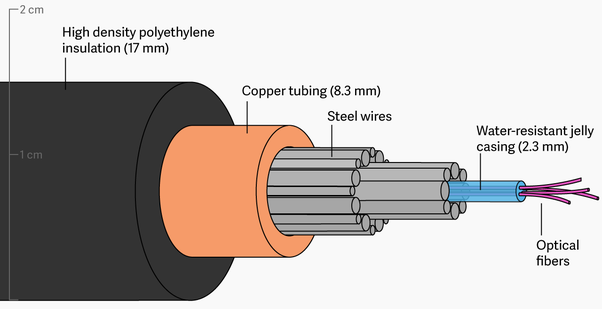
One of the greatest engineering achievements was the first ocean spanning fiber optic cable called TAT-8. It extended from Tuckerton, New Jersey, following the ocean floor over 3500 miles until branching out to Widemouth, England and Penmarch, France. Engineers designed the cable carefully to survive on the ocean floor. At its center lies the core. Less than a tenth of an inch in diameter, it contains six optical fibers wrapped around a central steel wire. They embedded this in an elastomer to cushion the fibers, surround it with steel strands and then sealed it inside a copper cylinder to protect it from water. The final cable was less than an inch in diameter, yet it could handle some 40,000 simultaneous phone calls.
The essence of how they send information through a fiber optic cable is very simple. I could have a pre-arranged signal with someone at the other end. Perhaps we will use Morse code and I just block the laser, so that the person at that end sees flashes that communicate a message. To transmit an analog signal, like voice from a phone call along the cable, engineers use Pulse Code Modulation. We take an analog signal and cut it up into sections and then approximate the wave’s loudness or amplitude as best we can.
We want to make this a digital signal, which means discrete values of loudness and not just any value. For example, I will use four bits, which means I have 16 possible values for the loudness. So the first four sections of the signal could be approximated by about 10, 12, 14 and 15. We then take each section and convert its amplitude to a series of ones and zeros. The first bar of value 10, when encoded, becomes one, zero, one, zero. We can do this for each section of the curve.
Now instead of looking at the green wave form or even the blue bars, we can think of the signal as a series of ones and zeros organized by time. It is that sequence that we send through a fiber optic cable of flash for one and nothing for a zero. Now of course, the exact method of encoding is known at the receiving end. So it is a trivial matter to decipher the message. Now you may be wondering how a laser pulse can travel nearly 4000 miles across the ocean. It doesn’t without some help because the light will escape from the sides of the fibers. Look back at our propylene stream.
Here’s how the light attenuates as it travels. You can see here a narrow beam in the bucket that broadens a bit when it enters the stream and then after the first bounce, the beam leaves even broader than it entered. That’s because the interface with the air is uneven and the rays that make up the beam strike at slightly different angles. When that beam makes its second reflection, those individual rays diverge even more. Until by the time it reaches the third bounce, many of the rays are no longer at the critical angle and can exit from the sides of the stream. Here it happens in a few inches but in fiber optic cables like TAT-8, the signal travels a stunning 50 kilometers before it needs to be amplified. Absolutely amazing. I’m Bill Hammack, the Engineer Guy.
Fiber Optic Internet Service Plan Considerations
When it comes to performance, Fastmetrics has explained and displayed how fiber optic internet is by far, the fastest internet service. In some cases, fiber optic internet plans can be up to 20 times the speed, or faster, than common broadband plans. In today’s society most businesses require the support of an internet service plan. To stay competitive, businesses must ensure that they have the best online capabilities. In this post, we look at the things that you should consider when looking into fiber optic internet plans from Fastmetrics, or any other fiber optic provider.
Fiber Optic Internet Plans Offer Increased Reliability
A fiber optic connection is less likely to be affected by service interruptions, due to its construction. As mentioned, engineers designed fiber optic cables such as TAT-8 to survive the pressures of the deep ocean. This is in order to be able to send signals across the world at the speed of light. Central steel wires are wrapped around optical fibers to protect them from breaking. In addition, for protection from water, engineers often seal optical fibers inside a copper tubing. Ironically, copper based internet connections are slower than fiber, but copper complements fiber in its construction.
Anatomy of an undersea fiber optic cable
In a recent Nadex article on copper as a commodity, it was discussed how copper has helped initiate global changes through improving infrastructure. And this couldn’t be more true in the role it plays in protecting fiber cables, offering increased durability and reliability for telecommunications. Because of this durable combination of materials, fiber optic cables are less likely to be affected by power outages. Or, interrupted by external factors such as electrical equipment and lightning. With the internet being the key foundation of many businesses, it is important to consider how crucial it is to have a reliable internet connection.
Fiber Optic Internet Plans Provide Faster Speeds
The first thing that business owners need to decide on when getting a fiber optic plan is the level of speed required. Just how fast do you need your Internet to be? As an example, Fastmetrics offers symmetric connections from 100 x 100 Mbps, 250 x 250 Mbps, 500 x 500 Mbps, 1000 x 1000 Mbps (Gigabit) to the fastest – 10 Gbps x 10 Gbps fiber service, as well as dedicated Ethernet with similar gigabit per second speeds. Depending on the how much your company utilizes the internet in its day-to-day operations, will depend on the speed the business needs. Contact us if you would like an estimate on the fiber speed you might require. This is based on the number of employees at your business, as well as what you need internet service for. Tip: Get an estimate on what fiber optic speed is optimal, so you can get a plan that supports your needs.
Fiber Internet: Faster Uploads & Cloud Access
If your business needs to store or send huge amounts of data, you should consider a plan with faster upload speeds to services such as the cloud. Downloading and uploading large files or data can take a long time on a broadband connection. Tip: Choose a fiber optic plan with adequate upload speed. (All Fastmetrics fiber optic plans provide symmetric speeds for fast cloud access and downloads).
High Speed Symmetric Fiber Connectivity
Not all fiber optic connections are created equal. Some may offer fast download speeds, but what about upload speed? Symmetric connections are ideal when using VoIP or cloud PBX phone services. If your business needs an internet solution with consistent upload and download speed, you need a high speed symmetrical fiber optic connection. Symmetric connectivity prevents unnecessary delays in the downloading and uploading of data.
Fiber Optic Internet Installation Cost
One of the most important things to consider is how much it will cost to install a fiber optic internet connection. Without existing fiber lines, upgrading your internet service to fiber can be a large upfront investment for businesses. Some buildings contain existing fiber internet infrastructure, or are ‘lit’ with fiber already. Lit fiber buildings reduce initial end user outlays for fiber construction.
Information Age states that fiber optic technology has a long life cycle, due to its unmatched internet speeds and protective construction. The tech site states “telecom infrastructures go from one generation to next in a matter of months”. For those considering a fiber optic plan for their business, we hope that this has proved informative. In our post ‘10 Benefits to Fiber Optic Internet’, we provide a summary of the 10 major benefits of why we believe investing in fiber optic connectivity is a good idea.
How Has Fiber Optic Technology Revolutionized Telecommunications?
It has taken many years for fiber optics to be used to their full potential for telecommunication services. Considering fiber optic technology was first created more than 43 years ago, progress has been slow. This is ironic, seeing fiber offers end users access to data at the speed of light. For Internet and bandwidth purposes, fiber optic technology is still largely underutilized. Only a handful of service providers in select countries provide complete access to fiber based networks.
The Basics – How Are Fiber Optic Transmissions Sent?
In addition to the video above, which goes deep into understanding how fiber optic cables work, below are the 3 basic steps to how a transmission is sent via fiber;
An optical signal is created using a transmitter
The signal is relayed via the fiber, ensuring the signal is not distorted or diminished
The signal is received and converted into an electrical signal
How Has Fiber Changed Telecommunications Today?
Since the establishment of the first fiber WAN in Essex in the U.K in 1978, fiber has slowly developed, grown and in some instances, completely replaced traditional copper based telecommunications services. Quite simply, fiber is a more efficient means of transmitting telecommunications signals (data and voice). Signals are sent by light over fibers made of glass, as opposed to copper wire.
Fiber vs. Copper vs. Cable – What Are The Advantages?
Fiber technology can be used for voice, (phones) and data (Internet and TV). It provides the following advantages over copper wire or cable based communications;
Lower attenuation – the loss of intensity of any kind of physical property through a medium. (For example, the signal strength over the optical fiber).
Less interference – electromagnetic interference effects an electrical circuit. This may interrupt, obstruct, degrade or limit a circuit’s performance. These effects may range from data limitation to total loss of data.
Disadvantages Of Fiber vs Copper vs Cable Based Internet
Previously, fiber optic infrastructure was not readily available in developed countries. Fiber was also costly and time consuming to install. Due to this, fiber was only used widely in long distance telephone communications, where it is used to it’s full capacity. By 2002, a worldwide network of more than 250,000 kilometers of fiber had been laid by the telecommunications industry, with a capacity of 2.56 Tb/s.
However, since the year 2000, the cost of fiber as an Internet service has been lowered greatly. In some cities in the United States, it is cheaper per subscriber, to roll out fiber to the home, than copper based service. This was evident through the Google Fiber program. The cost of fiber is even lower in countries such as the Netherlands and other developed Asian countries, such as South Korea and Japan. Click the link highlighted to see a complete comparison between DSL vs Fiber vs Cable.
Where Are Fiber Internet Networks Most Accessible?
In countries such as Japan, South Korea, Singapore and in many Scandinavian countries, fiber has largely replaced DSL as a broadband Internet service. Fiber infrastructure is extremely accessible in countries such as South Korea and also very affordable. This has led to countries such as Japan, Singapore and South Korea developing some of the fastest internet speeds in the world, along with many Scandinavian based countries.
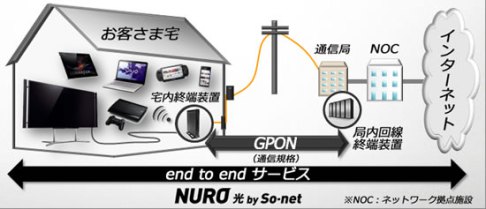
Japan’s So-net offers 2Gpbs fiber speed to the home
Where Is Fiber Most Available In The World?
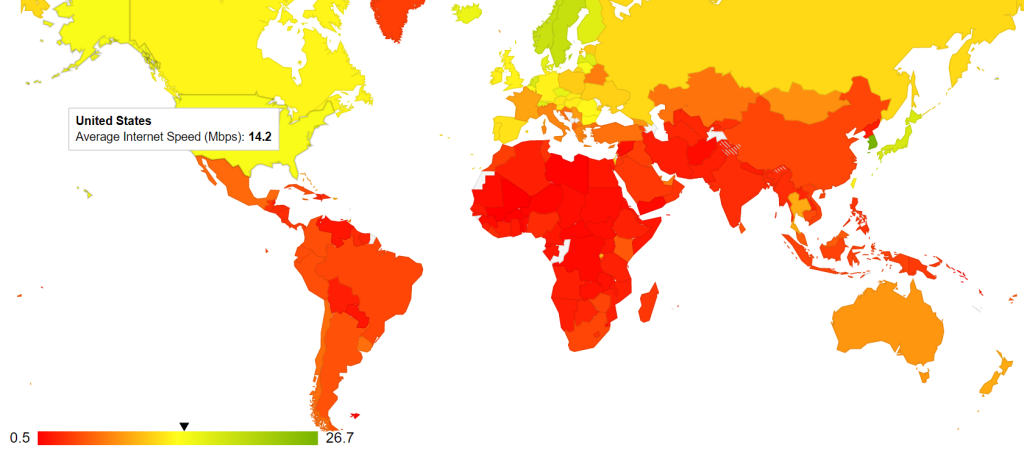
Our worldwide internet speed study analysed data from global internet speeds between 2015 and May 2018. There was a strong correlation to higher average internet speeds in countries with more access to fiber based infrastructure and service.
Countries in green in the map have the highest average internet speeds. These include; most Scandinavian countries, South Korea, Japan and some European countries. (Full interactive map and tables of data are available via the link above). Coincidentally, many of these countries have a strong fiber internet presence. Whilst it is not always readily available in every country or area, fiber based internet and communications are certainly more effective in today’s Information Age, where the demand for consumers and businesses alike to receive information faster and in a variety of digital mediums, is in high demand.
About Fastmetrics, Inc. Building & Business ISP
Since 2002, Fastmetrics is the Bay Area’s only dedicated business ISP. We provide telecommunication services in California and the San Francisco Bay Area. Reliable service – backed by better live and local support. From install to 24-7 proactive monitoring, get treated like a VIP customer. Not a number by a faceless call center. We specialize in managed business internet and phones, dedicated high speed business fiber internet, business WiFi, SIP voice solutions / UCaaS and managed network services. We are a Microsoft and Cisco Meraki Partner. Our team are Certified Cisco Specialists, Ubiquiti Enterprise Wireless Accredited and Polycom Authorized Solution Advisors. We take care of your business network, so you can focus on growth.
As a society, we are always connected. We expect more from our internet services. Whether that be from nearby cable or fiber optic internet providers, or a local broadband ISP. Today, fast and reliable connectivity is no longer a luxury, it is a must. These service expectations increase exponentially in the workplace.
When the opposite is true, your business can really suffer. Conference calls and videos are choppy; data storage and protection is slow, or worse – compromised. Employees can be become frustrated and less productive, which effects your bottom line. There’s no doubt that internet connectivity plays a significant role in business operations. When paired with the availability of multiple service providers and access options, selecting the right internet for your business or company can be a difficult choice.
This is often a choice that’s frequently between fiber optic internet providers and broadband connectivity options. That decision often comes down to one simple question: which one is better for my business? The answer to the question of broadband vs fiber relies on looking at multiple factors.
Top 5 Factors: Fiber Optic Internet Providers vs. Broadband Services
1. Improved Internet Service Reliability
For most, reliability is a leading factor when deciding what type of internet service to choose. Broadband and fiber optic both represent two of the most reliable connection types available to consumers and businesses today. However, although broadband is often reliable, when compared to alternative options such as fiber, it’s also the service most likely to face interruptions from a host of environmental and location factors.
By design, fiber optic Internet is a dedicated, passive system, meaning it is far less likely to be the effected by service interruptions. The dependable nature of our fiber optic internet solution, metricFIBER, carries a 99.999% service up time Service Level Agreement. This consistently makes fiber optic ISPs an attractive choice for businesses worldwide.
2. Bandwidth Considerations
Bandwidth, or the lack thereof, can have a huge impact on business operations at crucial times. Web conferences, video streaming, online presentations, supporting an IP based phone system or hosted IP PBX, file sharing, and cloud applications, can be challenging when upload and download speeds are stunted due to high demands on bandwidth. Broadband, such as DSL or cable internet connections are typically shared across different customers. Because of this, bandwidth, though sufficient at certain times, can be compromised during peak time or during heavy usage.
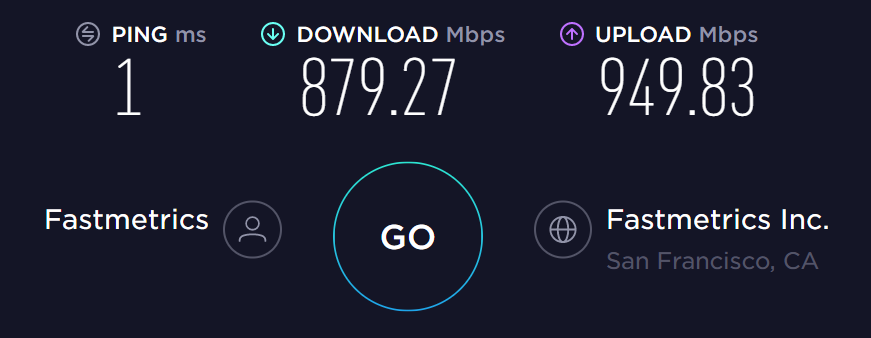
Typical Fastmetrics fiber speedtest.net result
Even for businesses with minimal broadband neighbors, periods of high data transmission internally can have the same effect. Fiber internet providers, on the other hand, operate as a dedicated service being used only by the business for which it’s established, negating much of that concern. Further, limits or data caps, though they do exist with some providers, are typically much higher (high enough to be considered “unlimited bandwidth” by many). Fiber certainly is designed to deliver an internet service with upload and download speeds that are as quick as they are reliable.
3. Cloud Access Requirements
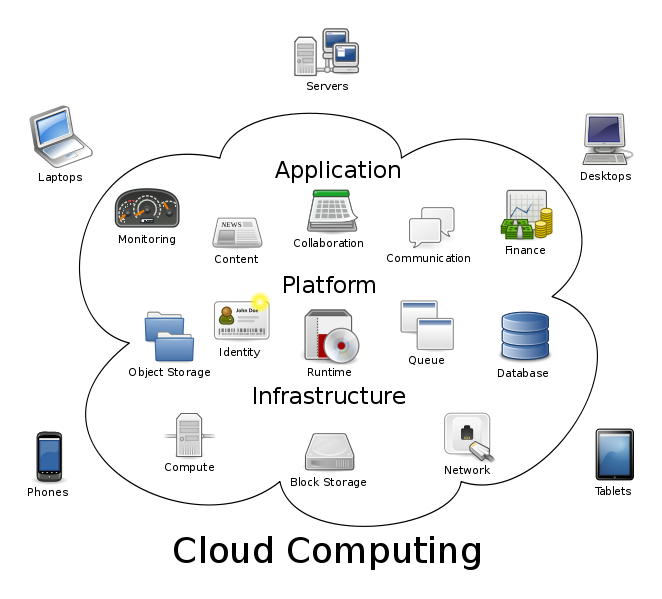
Today, cloud computing services and platforms such as cloud storage have become a major tool for businesses across the globe. Delays when accessing or uploading information to ‘the cloud’ can be problematic. Especially for businesses that work with clients or potential customers in real time (i.e., customer service, call centers, etc.) or those that rely on a global workforce.
Because of the two aforementioned benefits of fiber optics, cloud access and data storage, becomes another factor in the decision between broadband and fiber optics. Similarly, broadband, specifically its proclivity for delays and service interruptions, can make it a poor choose for significant cloud reliance. As such, for customers in the Bay Area who rely heavily on cloud storage would benefit from fiber internet.
4. Security Factors
Another concern that is increasingly important in our progressing cyber age – is security. Breaches happen so frequently we sometimes mistake it for normalcy. To combat that, many companies are searching for the best way to fortify their networks and data, from client records to valuable intellectual property. Of the two internet services discussed, a network using broadband is more vulnerable to malicious attacks. Infiltrating a network using broadband services can be easier than gaining access to a network employing a faster fiber optic internet service. For that reason, businesses or enterprises that are looking to increase the speed and reliability of their internet service, as well as fortify data stored online, may find a welcome solution in fiber optic providers.
5. Fiber Internet vs Broadband Pricing
Price and availability are often the two governing factors in any decision between choosing fiber network providers versus broadband. If your company is located in the Bay Area, we’ve got you covered either way. Though most information points to fiber optic internet providers as the clear winner in a battle of internet services, broadband is often the more affordable option. Your business budget for services must come into consideration, first and foremost.
Broadband vs Fiber Verdict: Choose a Fiber Optic ISP
Fiber optic connections are typically more expensive, for various reasons. However, we’ve been working in the Bay Area to make fiber optic more accessible and affordable. Today, as part of our fiberIVY network, we have more than 70 commercial buildings across the Bay Area ready with existing fiber optic infrastructure. For businesses in or thinking about moving to one of these buildings, fiber optic internet access is more cost effective.
Additionally, price is dynamic depending on speed requirements. With business productivity, customer satisfaction, and data security all factoring into the true price of internet service – a more reliable, quicker, and secure service, will lead to a stronger bottom line. In those terms, we truly think fiber optics can be a cost saving service for companies that need it.
There you have it. Broadband and fiber optic internet providers can both supply users access to the internet. While broadband may be a more affordable and feasible option that gets the job done in the short term, for lower bandwidth demands, fiber optics can take things to the next level. If your business needs secure and reliable access to the internet with unparalleled upload and download speeds, regular access to the cloud, contact us about metricFIBER or our dedicated Ethernet service to 10 Gbps symmetric. It just may be the right choice for your business.
What Is The Best Internet Service Technology?
The below video explains the workings of fiber (spelt fibre in the U.K) versus cable, in a battle of the ‘best internet service’ connection technology. Fiber vs copper video provided by Techquickie. Check out more of their videos which explain how tech works.
Video: Fiber Internet vs Copper Based Internet Services Explained
Video transcript: It’s the ultimate battle of the networking communications cables; copper versus fiber! Which will win the ultimate bandwidth challenge and send its opponents ping, crying home to mama? Let’s begin with the key characteristics of those good old, reliable copper phone lines. That’s right, the same basic infrastructure that we’ve been using since the beginning of the 20th century. Copper is highly conductive. This is what makes it so great for carrying the power to your home that you need to do all the things that are important that you need to do there.
Copper wires use the movement of electrons to carry signals by modulating a wave format one end, the demodulating it at the other end, to convert the patterns and the waveform into an analog or a digital signal. A device that modules and demodulates is called a modem. The problem is that copper, even higher bandwidth coaxial cables, can carry only a small number of wave forms, limiting its maximum data capacity and these wave forms degrade very quickly as the distance between the communications devices increases.
In fact, copper only has two main advantages today. One, it’s much less expensive per unit distance than fiber and two, it’s already deployed basically everywhere. Thanks telephone and television. Modern fiber optic cable invented by Corning Inc. in the ‘70s changed the game completely, by allowing the use of light bursts to carry a signal instead of waves traveling through metal.
Today, these cables are made up of a highly transparent, flexible glass core wrapped in a series of layers that protect both the integrity of the signal in the glass and the structure of the glass inside from the elements. Because this is light traveling through a nearly transparent medium, it moves at approximately 200,000 kilometers per second, actually not that different from an electrical signal through copper.
But much more importantly, the integrity of the signal, the ease with which we can interpret the light on versus light off at either end is much easier to maintain at higher switching speeds and over longer distances. I mean we’re talking thousands of kilometers like across oceans, giving fiber optic cables an enormous advantage in speed and well, distance.
There are lots of other cool stuff too. Optical signals are immune to electromagnetic interference. Individual fibers can be bundled together during installation. Some for use now, others dark for expand-ability in the future. Depending on the requirements, fiber can be used with LEDs or lasers and an individual fiber might transmit multiple wavelengths or colors of light at the same time to be a split-out at the end other end to further increase capacity.
Sounds great! Let’s use it for everything, Linus. Well, life is rarely that simple, isn’t it? We’re heading in that direction. But currently fiber is so much more expensive per length than copper that it’s taking a little while to get there. The good news is that copper carries some additional hidden costs that increase fiber’s appeal even further. Thicker, heavier cables are more difficult to install and may require more clearance than is even available in existing underground pathways.
In cases where multiple connections can leverage a single fiber backbone, the cost per capacity argument comes into play where even if two fibers cost 1000 times what copper would. If it can carry over 1000 times the data, the cost per customer and ISP conserved goes down and of course the distance thing comes into play again.
The ISP will save again on repeaters, that you will need all over the neighborhood to maintain the integrity of a signal that’s running on copper lines, so Mrs. Rochester’s connection doesn’t drop out in the middle of her Netflix marathon. But that doesn’t mean that every house will be getting a direct fiber connection anytime soon. It would certainly be nice. (As fiber clearly provides the best internet service). But hybrid deployments with a fiber backbone that serves many customers and copper runs to individuals for the last mile are most common today, because they deliver solid speeds and reliability, while saving a lot of money for the notoriously tightfisted ISPs that are managing the infrastructure.
Speaking of whatever it is I was just talking about, our sponsor today is Fractal Design and instead of me telling you guys about their simple Scandinavian design and great power supplies, cases and cooling products, we actually weren’t sure what to do this time. So I was like spit balling ideas. It was like, “What can we get at a dollar store?” Like glitter and Nick is like, “Yeah, sure.”
So he goes to a dollar store and comes back with a tube of glitter glue. Not only that. A tube of glitter glue, that’s actually completely hardened and dried out. So the only thing we ended up being able to do with it at all was make me pretty for you guys. So I hope you enjoyed it, all you viewers and you, Josh. Do you find me pretty and sparkly? Am I sparkling? Excellent. I’m sparkling. All right! So thanks again to Fractal Design for sponsoring today’s episode of Fast as Possible. Thanks to you guys for watching. Like this video if you liked it. Dislike it if you thought it sucked. Leave a comment if you have suggestions for future Fast as Possible episodes just like this one and Nick, that’s for you buddy. Don’t forget to subscribe.
Need More Help Deciding What Is The Best Internet Service?
Below are links to some additional guides and resources. Check download speed comparison tables, benefits graphics, answers to frequently asked questions and maps. Find what countries have the world’s fastest internet speeds and what technology they are using. Useful info to help you decide the best internet service for your needs;
Since 2002, Fastmetrics is the Bay Area’s only dedicated business ISP. We provide telecommunication services in California and the San Francisco Bay Area. Reliable service – backed by better live and local support. From install to 24-7 proactive monitoring, get treated like a VIP customer. Not a number by a faceless call center. We specialize in managed business internet and phones, dedicated high speed business fiber internet, business WiFi, SIP voice solutions / UCaaS and managed network services. We are a Microsoft and Cisco Meraki Partner. Our team are Certified Cisco Specialists, Ubiquiti Enterprise Wireless Accredited and Polycom Authorized Solution Advisors. We take care of your business network, so you can focus on growth.
See a sample of real Internet speed test results from Fastmetrics business customers going back to 2011. Also test your own Internet speed below. Our own speed tests cover Internet connection types including fiber, EoC, Ethernet and WiFi. Also provided is some average speed data comparing different San Francisco ISPs from M-Lab.
As a dedicated building and business ISP, we aim to provide download and upload speeds that are as close to symmetric as possible. Our fiber Internet and dedicated Ethernet circuits are backed by 99.999% uptime Service Level Agreements (SLA). All Fastmetrics business Internet service options are backed by 24-7 proactive monitoring, certified techs and live Bay Area support.
Because it’s how we use the Internet today. The emergence of cloud computing services is a major need for faster upload speeds. Demand for services such as cloud voice and access to cloud providers such as AWS, Google Cloud, Microsoft Azure, Salesforce and others, requires faster upload speeds.
Many Internet Service Providers do not offer symmetric service. Most speed test results prove upload speeds lag behind download speeds. Many ISPs only advertise their much faster (and more impressive) download speeds.
Because the increased use of bandwidth and data is a natural progression of how we use the Internet today. As a business only provider, all Fastmetrics Internet services offer unlimited data, (except our LTE backup). Many ISPs cap bandwidth or data usage. This means paying extra fees for going over data caps, or service speeds are throttled if data allowances are exceeded.
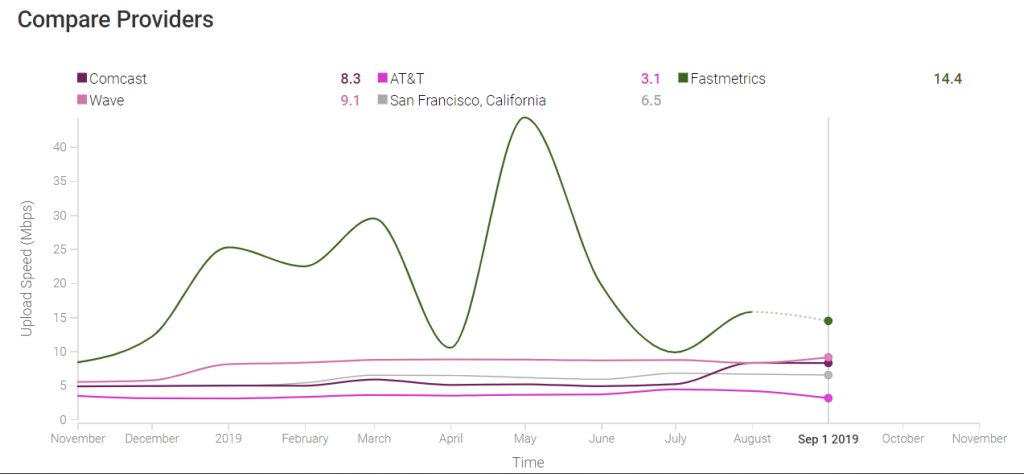
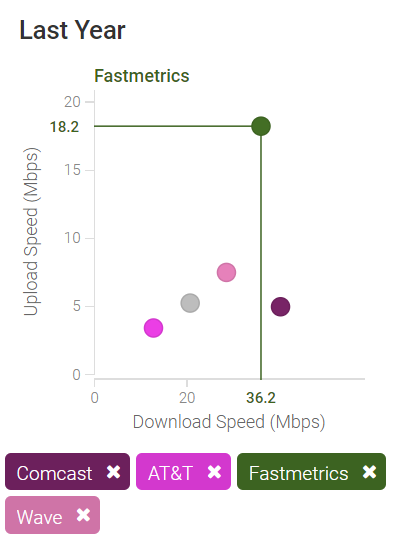
Fastmetrics average upload speed:As of September 1st 2019, 14.4 Mbps. 5.3 Mbps faster than Wave, with the next highest average upload speed of 9.1 Mbps.
Peak average upload speed:On May 1st 2019, Fastmetrics average upload speeds reached a peak of 44.3 Mbps. The next fastest San Francisco ISP was Wave with an average of 8.8 Mbps.
Combined average yearly download speed:Using a year’s worth of data from M-Lab, Fastmetrics average download speeds were slower than Comcast in San Francisco by 4.2 Mbps. Both ISP averages were faster than Wave, AT&T and the overall San Francisco ISP average.
Compare your speed test above with an alternative source. Try this Internet speed test provided by Speedcheck.
Fastmetrics Internet Service Speedtest Results
Most of the sample test results below are from business customers with our fiber internet service connections. San Francisco is the primary location, where our data center is. Ping times are measured from the customer locations back to our data center, on Spear Street. Fiber is the most popular business internet service we provide to our customers. Followed by our dedicated Ethernet service. Both of these services meet bandwidth heavy demands and are reliable with SLAs providing guaranteed up time. Our customers use these services to support multiple users and cloud based connectivity. Our fiber and Ethernet services provide speeds to 100 Gbps upload and 100 Gbps download.
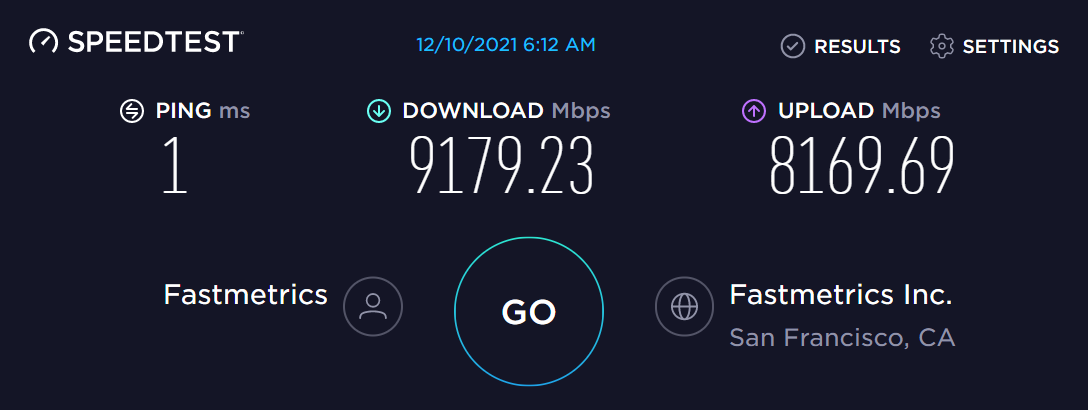
Multi Gigabit Speedtest Result Dec 10th, 2021
Yet another multi gigabit speedtest result from a customer’s office. Clocking in at over 9.1Gbps download and 8.1Gbps upload. Multi gigabit speeds open up a lot of possibilities. Get more done by reducing latency and connecting faster to cloud service providers such as AWS, Azure, Google Cloud and more.
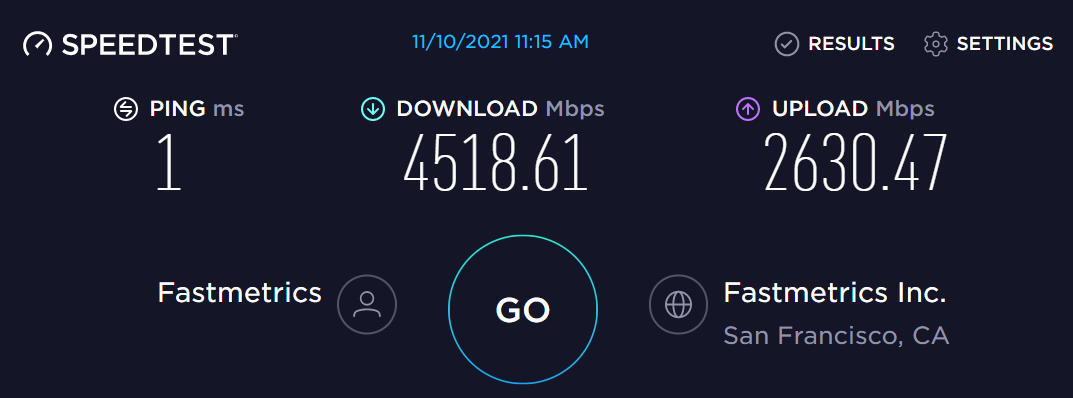
Gigabit Speedtest November 10th, 2021
Another recent multi gigabit internet speed test from a customer location, back to our San Francisco data center.
Fastmetrics Multi Gigabit Speedtest May 18th, 2021
The below speedtest video was recorded from our San Francisco head office on May 18th, 2021. This is a fraction of the connectivity speed we actually provision to customers. (The Gigabit result in the first screen of the video below, is another Fastmetrics gigabit speedtest too). Our Internet service and direct connect speeds reach up to 10 Gigabits per second, upload and download. Our speedtests are often limited by the testing equipment used. This speed test used a Lenovo T480 laptop plugged into a Thunderbolt3 adapter, which in turn was plugged into a 10Gig switch at our office.
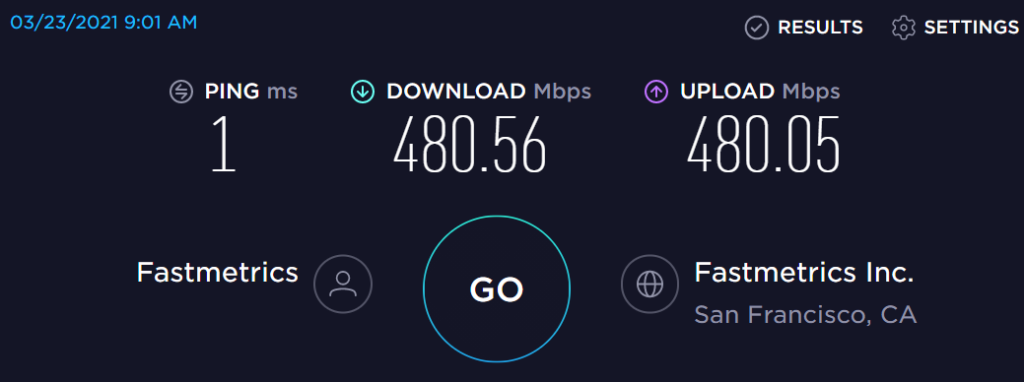
Fastmetrics Fiber Internet Speedtest March 23rd, 2021
This San Francisco software developer wanted more reliability, which they weren’t getting from their wireless ISP. We installed and setup fiber. The result is faster up and down speeds, backed by our 99.99% uptime metricFIBER SLA.
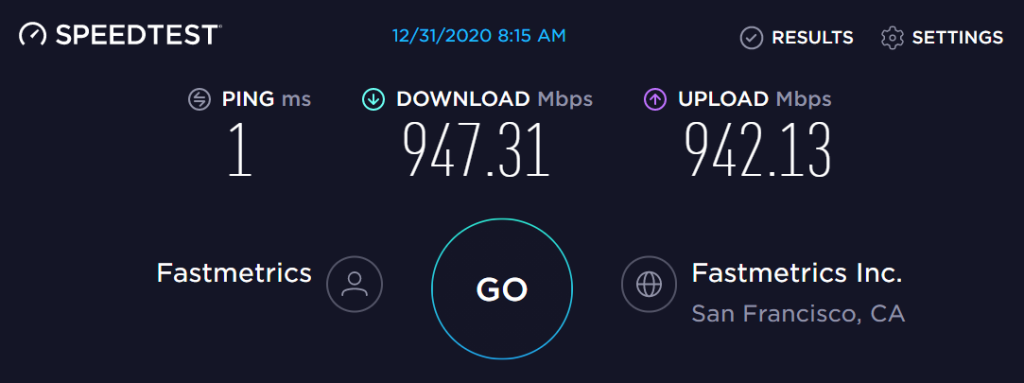
Fastmetrics Fiber Internet Speed Upgrade Results: Dec 31st, 2020
On new years eve in 2020, we upgraded the fiber Internet service speed of this San Francisco public health organization. Fast symmetric speeds over 940 Mbps over download and upload. 1ms ping.
Mobile Speed Test – Business WiFi Service San Francisco: May 28th, 2020
This test completed via iPhone, shows the download and upload capability of our managed business WiFi service. This was tested from San Francisco. The service is available to businesses across the entire Bay Area
Bay Area Customer Internet Speed Test: April 23rd, 2020
New Customer Speed Test Result: April 21st, 2020
Fiber & Direct Cloud Connect Customer Speed Test – October 22nd, 2019
Symmetric Internet Speed Result For Bay Area Customer – October 10th, 2019
Fiber Speedtest.net Result – September 11th, 2019
Fiber Internet Speed Result – August 19th, 2019
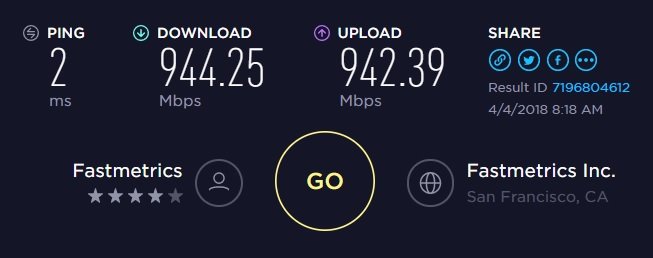
Fiber Optic Internet Speed Test Result – April 4th, 2018
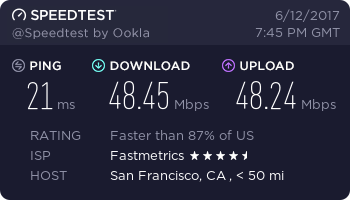
Backup Internet Speedtest Result – June 12th, 2017
Close to symmetric for this customer. Note that some bandwidth is required to keep the connection open, so not the complete 50 Mbps. This circuit is used by our customer as a fail-over solution.
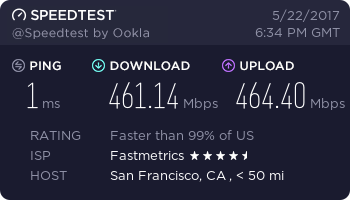
Fiber Optic Internet Speed Test – May 22nd, 2017
Fiber speed test for a San Francisco based customer. This fiber connection is used as a backup to the primary connection of a large company. Note the upload speed in this speed test exceeds the download speed.
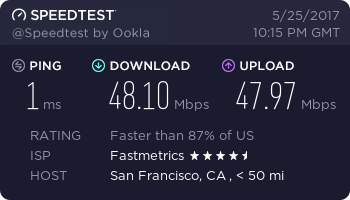
Fiber Internet Test Result – May 25th, 2017
Very close to a symmetric connection for this San Francisco apparel business. Note that some bandwidth is required to keep the connection open.
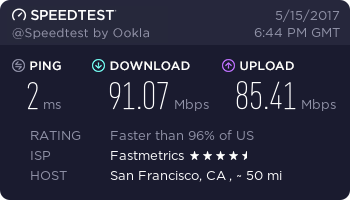
Fiber Speedtest.net Result – May 15th, 2017
A lower tier connection test, coming in at under 100 Mbps. Internet service for a Bay Area based business customer.
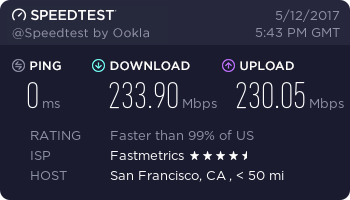
Fiber Internet Service Test – May 12th, 2017
Symmetric fiber internet connection speed test result for another SF based customer. Note the upload speed of just over 230 Mbps.
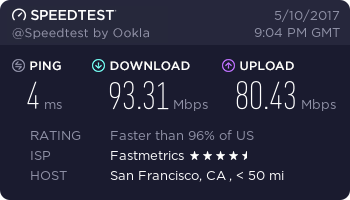
Business WiFi Service Speed Test – May 10th, 2017
A good result here for business WiFi service. Note the slightly slower ping of 4 ms. Upload speed is not symmetric, but still fast. We provide completely managed WiFi service. This provides optimal speed performance for a business wireless network.
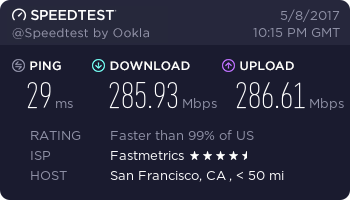
Fiber Internet Speed Test – May 8th, 2017
Note the upload speed for this test actually exceeds the download speed, which is rare.
Business WiFi Speed Test From Mobile – 22nd Jan, 2016
Business WiFi test from one of our Network Engineers, after WiFi network setup at a customer location. Using a Samsung mobile device.
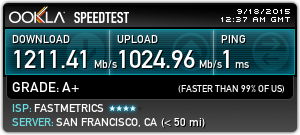
Gigabit Fiber Internet Speed Test Result – September 18th, 2015
This 2015 speedtest.net result, shows the capabilities of our Gigabit fiber service. Gigabit internet download speed alone, combines the power of approximately 660 bonded T1s!
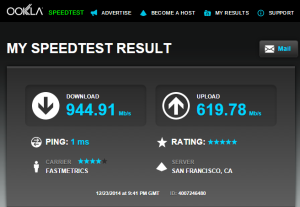
Fiber Internet Speed Result – December 23rd, 2014
Another fiber optic test result here. Good ping time and download speed. Upload speed is still fast at > 600 Mbps, but it’s not symmetric.
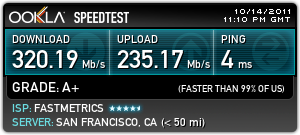
Fiber Optic Internet Speed Result – October 14th, 2011
This speed test from 2011 is also for a business fiber customer. Note the ping time is a little slower than our gigabit result above.
More Speed Test & Internet Service Resources
A speed test with Comparitech donates $0.01 USD to the Electronic Frontier Foundation, a non-profit digital rights advocacy group, for Computers 4 Africa
Our new 10 gigabits per second (symmetric upload and download speeds) fiber or dedicated Ethernet service, is now available to qualified businesses. We created a short video for the Fastmetrics YouTube channel, to promote this new business service offering.
Video transcription: Is your business looking for fast, reliable and secure internet service? Fastmetrics supplies symmetric fiber, scalable to 10 gigabits per second. Backed by local support in the Bay Area. Get a free install at your business today! Visit fastmetrics.com
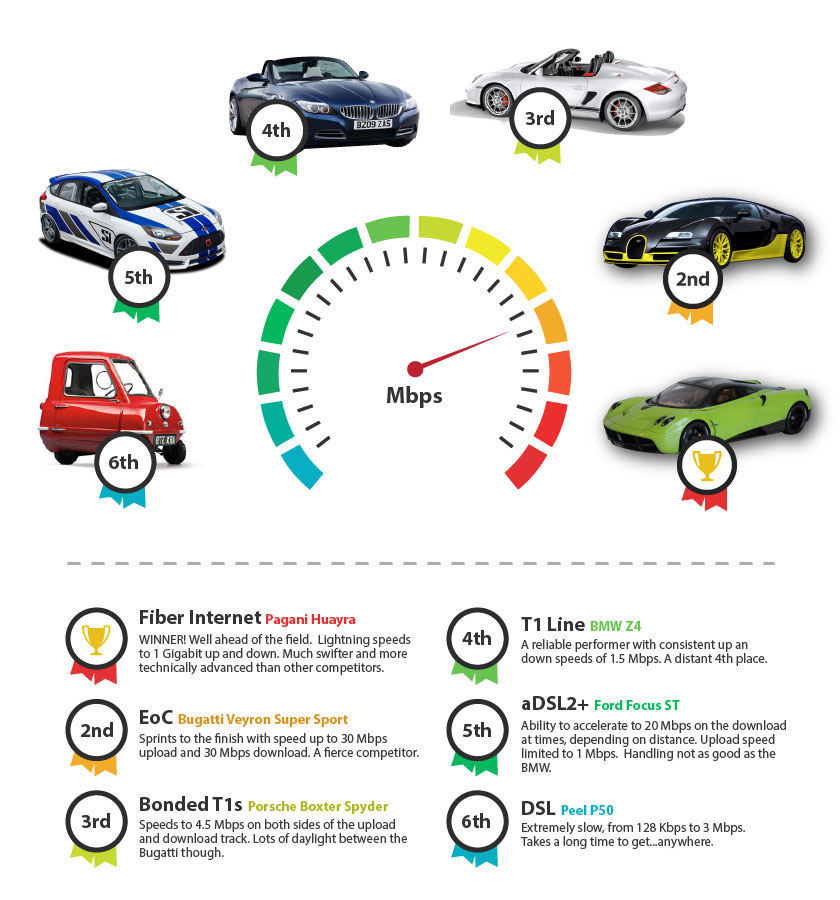
Internet Speed Raceway Infographic
We raced popular Internet services, then paired each service with a car. Placings were awarded from 1st to 6th. Business Internet services were matched with cars based on performances in the ‘power lap’ of the BBC racing show, Top Gear. Results from the BBC show were given preference over U.S results, due to a larger range of speed tests. No offense to any Peel P50 or DSL ‘drivers’! Considerations from each Internet service;
Since 2002, Fastmetrics is the Bay Area’s only dedicated business ISP. We provide telecommunication services in California and the San Francisco Bay Area. Reliable service – backed by better live and local support. From install to 24-7 proactive monitoring, get treated like a VIP customer. Not a number by a faceless call center. We specialize in managed business internet and phones, dedicated high speed business fiber internet, business WiFi, SIP voice solutions / UCaaS and managed network services. We are a Microsoft and Cisco Meraki Partner. Our team are Certified Cisco Specialists, Ubiquiti Enterprise Wireless Accredited and Polycom Authorized Solution Advisors. We take care of your business network, so you can focus on growth.
Are considering a change / upgrade to your internet service or ISP, but not sure if it’s worth it
Want to know the disadvantages / advantages of each different type of internet connection
Want to find out how different internet connections work
DSL vs Cable vs Fiber Internet Explainer Video
The video below by French Toast Philip explains each of the three main internet connection types available today. (As simply as possible). It can help you make a more informed decision on what type of internet service you should consider. You may also consider to ensure that you get the possible services you need, .
DSL vs Cable vs Fiber Internet Video Transcription
Your home or business internet is one of these three – cable, DSL or fiber because no one uses dial-up anymore. They do the same thing, which is provide you internet access. But they have their own advantages and disadvantages. So without further ado, let’s get right into it.
Cable internet is a type of connection that transmits data through a cable television network through a coaxial cable. While cable is generally faster than DSL, its primary disadvantage is that you’re sharing bandwidth with neighbors who are using the same cable line. So during peak times where a lot of people are online, your speeds are going to slow down considerably. But on the upside, cable internet speeds are not affected by how far you are from your ISP or Internet Service Provider.
DSL stands for digital subscriber line. It is a type of connection that transmits data over a telephone network through a telephone cable. DSL is the most popular connection in the world. Over 60 percent of broadband connections are DSL. Unlike cable, DSL bandwidth is not shared. But on the downside, DSL internet speeds are affected by how far you are from your ISP. So the farther you are, the slower your speeds. There are two types of DSL connections – asymmetric and symmetric. Asymmetric offers higher download speeds than upload speeds while symmetric offers equal download speeds and upload speeds.
Fiber optic communication is the future of data transmission. Data is transmitted through plastic or glass wires as light waves. Fiber optics offer the most potential for high speed data transmission and is the clear solution for our growing bandwidth needs. Its main disadvantage however is that fiber is expensive to install, which is the main reason why it’s still not very widespread today. Now let’s go over to what really matters and that’s their speeds.
DSL vs Cable vs Fiber Internet Speeds
DSL will give you between 128 kilobits per second to 24 megabits per second download speed. But speeds are constantly being upgraded. Like at the recent Broadband World Forum in Amsterdam where companies announced that DSL speeds will be boosted to one gigabit per second in 2016. Cable internet on the other hand will give you speeds of up to 150 megabits per second download speed. However, again, this is shared bandwidth. So during peak times, you’re going to get much slower speeds. Like DSL, cable internet providers are looking to provide gigabit internet in 2016.
Fiber is really fast, like really, really fast. While DSL has yet to achieve gigabit internet speeds, fiber already has. Google Fiber is an internet and TV service that gives you speeds of one gigabit per second download and one gigabit per second upload. That’s 1000 megabits per second down and 1000 megabits per second up. With gigabit internet, you can download a whole album in one second. You can download a one gigabyte file or upload your one gigabyte YouTube video in eight seconds. But fiber doesn’t end there. Researchers have achieved speeds of 255 terabits per second, which is about 32 terabytes per second. With that kind of speed, you can download a one-gigabyte file in 31.25 microseconds. Thirty-one point twenty-five microseconds.
But 255 terabit and gigabit internet is far from being a commercial product like long, long term. As of now, Google Fiber is only available in 11 cities in the United States. But this is something to definitely look forward to. The applications of fiber optics are not limited to the internet. They also include telecommunications, cable TV and electricity transmission. Anyway guys, that’s going to be it for this video. Thanks for watching and I will catch you on the next one.
Compare Different Business Internet Services & Speeds
Since 2002, Fastmetrics is the Bay Area’s only dedicated business ISP. We provide telecommunication services in California and the San Francisco Bay Area. Reliable service – backed by better live and local support. From install to 24-7 proactive monitoring, get treated like a VIP customer. Not a number by a faceless call center. We specialize in managed business internet and phones, dedicated high speed business fiber internet, business WiFi, SIP voice solutions / UCaaS and managed network services. We are a Microsoft and Cisco Meraki Partner. Our team are Certified Cisco Specialists, Ubiquiti Enterprise Wireless Accredited and Polycom Authorized Solution Advisors. We take care of your business network, so you can focus on growth.
You likely heard the fiber internet news in June – Google Fiber acquired local Wireless Internet Service Provider, Webpass. This acquisition and other Google Fiber developments, dominated fiber news headlines over the last year. We thought it an opportune time to look back and recap on the most popular fiber internet news over the last 12 months. Here are the most shared stories, as discovered via BuzzSumo.
Number 8. At number 8, with 5,100 shares on social media, Sheldon Shafer’s piece on the Courier- Journal; “Google Fiber, city examine ultrafast Internet“. Sheldon’s article was published on September 11th, 2015. Follow and see more of Sheldon’s work here; @sheldonshafer
Number 5. Klint Finley also wrote about Google’s acquisition of Webpass on wired.com; “Google Fiber Just Swallowed Up Another Internet Provider“. Klint’s report has had 6.9k shares on social media, after publication on the 23rd of June, this year. Follow and see more of Klint’s work here; @klintron